Thesis Whisperer's avatarThe Thesis Whisperer

This post is by Julio Peironcely, founder and editor of the Next Scientist blog. Julio is a PhD student in Metabolomics and Metabolite Identification at Leiden University, The Netherlands and has been blogging and using social media for several years, both for fun and for professional purposes.

This post developed out of a conversation on Twitter about the difficulties of socialising at academic conferences, particularly at the dinner.  I was thrilled when Julio sent me this post which is a comprehensive set of advice which anyone, scientist or not, can benefit from. Take it away Julio!

conference dinnerYou didn’t meet anybody new at the last scientific conference.

You paid high registration fees, travelled to the other side of the world, listened to boring talks, nobody came to your poster.

At least you met interesting people at the conference dinner, didn’t you?

Well, it’s kind of hard when you are…

View original post 1,533 more words

Leave a comment

Filed under Uncategorized

Concurrency with C++11

Having watched Herb Sutter’s C++ Concurrency video, I wanted to try out a few of the techniques for myself. The first step was to write a simple synchronised queue, which he left as an exercise for the reader.  The key feature is that pop() blocks until an element is pushed into the queue – then it returns the element.  This turns out to be pretty succinct using C++11 features like std::mutex and std::condition_variable:

namespace musingstudio
{
  template<typename T>
  class SynchronizedQueue
  {
    std::deque<T> m_queue;
    std::mutex m_mutex;
    std::condition_variable m_wait_for_non_empty;

  public:
    // When an element of T is pushed onto the queue,
    // one caller waiting in a pop() call will be notified
    void push( const T& t )
    {
      std::unique_lock<std::mutex> lock(m_mutex);
      m_queue.push_back(t);
      m_wait_for_non_empty.notify_one();
    }

    // Calls to pop() will block until an element of T is 
    // pushed onto the queue
    T pop()
    {
      std::unique_lock<std::mutex> lock(m_mutex);
      while(m_queue.empty())
      {
        m_wait_for_non_empty.wait(lock);
      }
      T tmp(m_queue.front());
      m_queue.pop_front();
      return tmp;
    }
  };
}

and here’s some code to exercise it:

void testConcurrentQueue()
{
  musingstudio::SynchronizedQueue<int> elements;

  std::thread pusher([&]()
  {
    for (int i = 0; i < 5; ++i)
    {
      wait();
      std::cout << "Pushing " << i << '\n';
      elements.push(i);
    }
  });

  std::thread popper([&]()
  {
    for (int j = 0; j < 5; ++j )
    {
      int popped = elements.pop();
      std::cout << "Popped " << popped << "\n";
    }
  });

  pusher.join();
  popper.join();
}

Output:
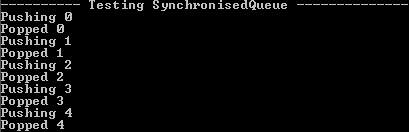
SynchronizedQueueOutput

The next item that caught my eye was a template class that wraps an instance of T so that access to it becomes transactional across threads. No need to explicitly take a lock for each group of calls to the object – instead, you express each transaction on on the instance of T as a lambda. A mutex blocks and the command (expressed as a lambda) is executed in the calling thread.  Herb called his example Monitor<T>, but I preferred Sequential<T> as a partner to Concurrent<T> (see below).  Also, I replaced operator() with excute() (in my opinion it’s easier to read).  Typical use looks like this:

Sequential<T> t( ... ); 
t.execute([&](T& u)
{  
  /* perform multiple operations in this lambda as one synchronised transaction*/  
});

So much for the context – here’s the implementation:

namespace musingstudio
{
  template<typename T>
  class Sequential
  {
    mutable T m_t;
    mutable std::mutex m_mutex;
  public:
    Sequential( T t ) : m_t( t )
    {
    }
    template<typename F>
    auto execute( F f ) const -> decltype(f(m_t))
    {
      std::unique_lock<std::mutex> lock(m_mutex);
      return f(m_t);
    }
  };
}

And here’s the code in action, using Sequential<ostream&> to synchronise calls to std::cout:

void testSequential()
{
  musingstudio::Sequential<std::ostream&> sync_cout( std::cout );
  auto doPush = [&]() 
  {
    for ( int i = 0; i < 10; ++i )
    {
      sync_cout.execute([&](std::ostream& os)
      {
        os << i << i << i << i << i << "\n";
      });
    }
  };
  std::thread thread1(doPush);
  std::thread thread2(doPush);
  thread1.join();
  thread2.join();
}

Output:
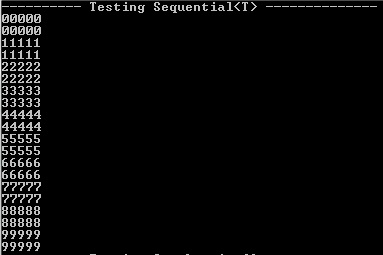
SequentialOutput

Now that we’ve got SynchronizedQueue<T> and Sequential<T>, here’s Concurrent<T> which provides a way to perform a series of synchronised operations on some object in parallel with the activity on the main thread.  For example, if you need to keep a GUI thread responsive.  I love the idea of pushing a “Done” event onto the message queue in the destructor so that queued work is concluded and then Concurrent<T> returns.  This is also a very nice use for std::future and std::promise – allow the caller to keep the return value as a future, but don’t block until it’s needed.

template<typename T>
class Concurrent
{
  mutable T m_t;
  mutable SynchronizedQueue<std::function<void()>> m_queue;
  bool m_done;
  std::thread m_worker;
  // Assign value to the promise where there's a 
  // non-trivial return type
  template<typename Ret, typename Ftn, typename T>
  void setValue( std::promise<Ret>& promise, Ftn& f, T& t ) const
  {
    promise.set_value( f(t) );
  }
  // Assign void to the promise - trivial void return type
  template<typename Ftn, typename T>
  void setValue( std::promise<void>& promise, Ftn& f, T& t ) const
  {
    f(t);
    promise.set_value();
  }
public:
  Concurrent( T t ) : m_t(t), m_done(false), 
    m_worker( [=](){ while(!this->m_done){ m_queue.pop()(); }} )
  {}
  ~Concurrent()
  {
    m_queue.push( [=]{ this->m_done = true; } );
    m_worker.join();
  }
  // In order to return a value from the operation that we 
  // process on another thread, use async, promises and futures 
  // - we can't just return the calculated value,
  // because then the caller would have to block.
  template<typename F>
  auto execute( F f ) const -> std::future<decltype(f(m_t))>
  {
    auto promise = 
      std::make_shared<std::promise<decltype(f(m_t))>>();
    auto return_value = promise->get_future();
    m_queue.push( [=]()
    { 
      try
      {
        setValue( *promise, f, m_t );
      }
      catch(...)
      { promise->set_exception( std::current_exception() ); }
    });
    return return_value;
 }
};

Here’s some code to exercise Concurrent<T>:

void testConcurrentReturningFunction()
{
  musingstudio::Concurrent<std::string> words("Concurrent<T> - ");
  std::vector<std::future<std::string>> values;
  // Set off the calculations in a worker thread, storing future return values
  for ( size_t i = 0; i < 10; ++i )
  {
    values.push_back( 
      words.execute( [=]( std::string& in )
      {
        in += std::to_string(i);
        return in;
      }) );
  }
  // Now collection the return values and display them
  std::for_each( values.begin(), values.end(), [](std::future<std::string>& f)
  {
    std::cout << f.get() << "\n";
  });
}

Output:

ConcurrentOutput

7 Comments

Filed under C++ Code

Silent Circle launches new encryption app

Silent Circle have announced a new encryption app:

The technology uses a sophisticated peer-to-peer encryption technique that allows users to send encrypted files of up to 60 megabytes through a “Silent Text” app.

“We feel that every citizen has a right to communicate,” Janke says, “the right to send data without the fear of it being grabbed out of the air and used by criminals, stored by governments, and aggregated by companies that sell it.”

I can see the practical value in this (for example, if you need to send sensitive documents from work to home), as well as the human rights slant that the article explores.

Leave a comment

Filed under Technology

Writing C++11 concurrency code on Linux Mint with gcc 4.7.2

I’ve written some C++11 concurrency code in VS2012 with the November CTP and wanted to test if it would also run on Linux compiled with gcc – hence the effort to upgrade my laptop over the last couple of days. The upgrade worked fine – I’m quite impressed with Linux Mint and with CodeBlocks. Unfortunately, gcc 4.7.2 has left me disappointed.

Firstly, I tried to compile my whole concurrency project – I was expecting a few minor tweaks (gcc was stricter on how I declare my template functions), then I hit this Internal Compiler Error:

Concurrency.cpp:156:1: internal compiler error: in get_expr_operands, at tree-ssa-operands.c:1035

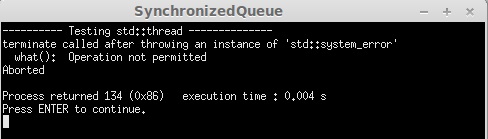
Apparently, this bug has been fixed but not yet released – it’s due to calling a member function from a lambda in a templated class. So I thought I’d cut my code down, eliminate the lambdas and focus on std::thread and std::condition_variable. Still no joy, this time the program aborted:

LinuxAbort1

In fact, it seems this is a long standing issue. And the code to provoke it is hardly pushing the boundaries of threading:

void sayHelloWorld()
{
    std::cout << "Hello World\n";
}

int main()
{
    std::thread talk( sayHelloWorld );
    talk.join();
    return 0; 
}

Looking on the bright side, gcc 4.8 should be along soon and I’m sure the support for std::thread and lambdas will be working by then. In the meantime, I’ll be hanging out with VS2012 Nov CTP.

1 Comment

Filed under C++ Code

Programming C++ on Linux Mint

First of all, let me say how easy it was to install CodeBlocks and CodeLite on Linux Mint using the Software Manager.  The user guide makes a terrific case for the Linux package management approach, but putting this UI on top (instead of using the command line as I was in Kubuntu) takes it to the next level.  For a start, it’s browsable and you can read reviews from other users.  I’ve installed CodeBlocks, CodeLite and g++.  I really like the way that the sections in Software Manager match the groupings from the start menu (so that my programming related applications are together and easily visible).

CodeBlocks
First impressions – not bad, it detected that I wanted to use gcc as my compiler.  I created a simple Hello World project and it compiled first time.  When I tried to add C++11 features, I got compile errors – but those were resolved by editing the Project build options and enabling “Have g++ follow the coming C++0x ISO C++ language standard”, i.e. -std=c++0x.  I rather like this dialog – it offers other useful compiler options too like “-Weffc++” to turn on Effective C++ warnings, with each compiler flag neatly explained.  As soon as I’d enabled -std=c++0x, the lambda and auto that I’d added compiled and ran just fine.

CodeLite

Oh dear.  Firstly, it offered to download a new version of CodeLite for me.  Given that I only just did it in Software Manager, that seemed a bit odd.  Next, I tried to create a new workspace – it crashed.  I tried to open the workspace it had created – crashed again.  This is probably because Software Manager needs to be updated to download the latest version, but I’ve uninstalled it for now.

Leave a comment

Filed under C++, Programming

Installing Linux Mint

I’ve decided to install a new flavour of Linux, as mentioned in my earlier post. Even choosing Mint ahead of Fedora and Bodhi hasn’t narrowed down the choices sufficiently – I then had to choose between the KDE, Xfce and vanilla versions. Then for the vanilla, you have to choose MATE or Cinnamon!

Having opted for the vanilla, Cinnamon version, I downloaded the ISO file and burned it to a DVD. Now the fun part – my Sony Vaio does not have an optical drive, but I have an external one so wired it up. Then, I had to boot up the laptop, press F2 to edit the BIOS and a) enable booting from external device b) put external device before the hard disk in the boot order. But I still couldn’t install from the Boot disk – it just wasn’t recognized when booting.

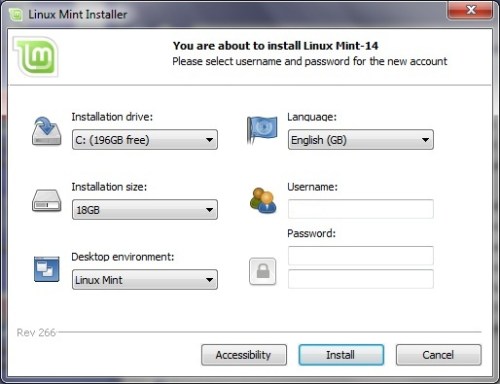
Instead, I used MagicISO CD/DVD manager, which virtually mounts an ISO as a CD/DVD drive. That took me to an option to install Linux Mint as part of Windows. Unfortunately, it forced me to uninstall the Wubi Kubuntu that I’d previously installed, but since that was broken anyway, I went ahead. I had to manually re-run mint4win.exe due to the kubuntu uninstall, then I could start the installation onto my local c:\.

LinuxMint - install1

This installation only took a couple of minutes(*), then a mandatory re-boot, then voila. If I’d just run the installation directly from the ISO image instead of trying to burn a DVD and boot from it, this would have taken 10 minutes rather than 2 hours.

LinuxMint - install2

The Linux Mint desktop started without any manual editing in blacklist files (unlike when I installed Kubuntu last year). I didn’t have any trouble hooking up to Wifi either, just worked out of the box. My laptop is now dual-boot with Linux Mint v Windows 7 – not bad.

LinuxMint - install3

(*)Except – looks like that was only to run in Live mode (as if from the DVD). The give away was that it forgot my Wifi settings when I next booted into Linux. To actually install, I clicked on the “Install Linux Mint” desktop icon. The instructions were well explained in the handy user guide and only took about 15 minutes.

2 Comments

Filed under Programming, Technology

Regulating High Frequency Trading

Andrew Keller’s article Robocops: Regulating High Frequency Trading After the Flash Crash of 2010:

This emphasis on speed is the primary defining aspect to high frequency trading: it is the main difference between traditional investment management and HFT. It also distinguishes HFT from other algorithmic trading strategies. HFT is a subset of algorithmic trading, where both use programmed algorithms to execute automated order submissions and automated order management. However, it is common for a non-HFT algorithmic strategy to hold traded securities for days, weeks or months, whereas HFT traders usually end the trading day flat, with no significant holdings. Furthermore, ultra-fast trading speeds are not necessary in a non-HFT algorithmic strategy; HFT, on the other hand, uses strategies that require speed to gain advantages in the market.

“smoking” is an HFT scheme that exploits slow traders by offering attractive limit orders, then quickly revising these prices to take advantage of an unsuspecting slow trader’s market order.

Presumably, the exchanges know the players and have a better starting point than government regulators in attempting to understand HFT methods and strategies. HFT computers are also tied directly into the exchanges’ computer systems which provide the exchanges an advantage in compiling data. On the other hand, the exchanges have strong incentives to provide free reign to HFT traders: they earn high rents from co-location, and significant fees from large amounts of trading. The exchanges want HFT traders to continue playing a significant role in the markets, and may not be a reliable regulator.

Leave a comment

Filed under Finance

Alexandrescu Video – Three Optimization Tips for C++

Andrei Alexandrescu gave this talk on optimization tips for C++. He claims you should aim to:

  • Measure performance against a baseline
  • Choose algorithms that use the least heavyweight operations
  • Reduce array writes

The slides are also available.

Measuring gives you a leg up on experts who don’t need to measure

He also presents a handy ordering of different integral/floating point operations in terms of cost. The techniques (which he has internalised to give a gut feel of whether some improvement will produce a speed-up) are illustrated with a classic interview question (convert an integer to ascii) that is heavily used at Facebook.

The underlying message of this presentation is that the cost of one engineer spending time producing some pretty esoteric code with massive performance benefits is more than outweighed by the savings in terms of data centre costs (due to improved speed, you can scale back spend on servers).

Leave a comment

Filed under C++, Video

Choosing a new brand of Linux

I started trying to upgrade my Kubuntu installation so that I could use gcc 4.7 and test the portability of some C++11 code I’ve been writing. So far, it’s not good news – despite having upgraded gcc and Eclipse, the standard library hasn’t upgraded (/usr/lib/c++ only contains 4.6) and trying to install libstdc++ results in obscure error messages.

So the time has come to try a new Linux distribution. Going back a year or so, installing Kubuntu was a chore – my Vaio laptop’s graphics driver wasn’t recognised and I recall making some low-level changes to get it working. Therefore, my main priority is to pick a Linux distribution with easy installation and that hints at good hardware support.

This article talks about Fedora, Mint and Bodhi. Funny that this could be a case of ‘better the devil you know’ – I know an Ubuntu derivative was a pain last time, but at least I did find examples of other people having the same issue as me! I’d never heard of Bodhi before, but it sounds ideal – very fast to install and is an Ubuntu derivative so should support my Vaio hardware.

As for an IDE, I was never very impressed with Eclipse, so I’ll try something else. Each of Codeblocks, NetBeans and CodeLite get good comments.

Leave a comment

Filed under Programming, Technology

Human traders v robots

Mike O’Hara of HFTReview interviewed Prof Alex Preda about his research into how modern day retail investors are trading (free registration required to view the full article).

London traders are working and building models together with traders situated on the US East Coast or in the Mid West. They use social media intensively in order to combine and match their skills, to develop trading algorithms. This kind of work has become almost impossible for a single trader to sustain, so they build these small groups of maybe five or six people, situated in different locations, in different countries, all coordinating with each other in building and testing their robots. They’ve become very, very savvy.

Leave a comment

Filed under Finance