Writing C++11 concurrency code on Linux Mint with gcc 4.7.2

I’ve written some C++11 concurrency code in VS2012 with the November CTP and wanted to test if it would also run on Linux compiled with gcc – hence the effort to upgrade my laptop over the last couple of days. The upgrade worked fine – I’m quite impressed with Linux Mint and with CodeBlocks. Unfortunately, gcc 4.7.2 has left me disappointed.

Firstly, I tried to compile my whole concurrency project – I was expecting a few minor tweaks (gcc was stricter on how I declare my template functions), then I hit this Internal Compiler Error:

Concurrency.cpp:156:1: internal compiler error: in get_expr_operands, at tree-ssa-operands.c:1035

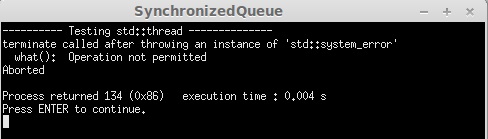
Apparently, this bug has been fixed but not yet released – it’s due to calling a member function from a lambda in a templated class. So I thought I’d cut my code down, eliminate the lambdas and focus on std::thread and std::condition_variable. Still no joy, this time the program aborted:

LinuxAbort1

In fact, it seems this is a long standing issue. And the code to provoke it is hardly pushing the boundaries of threading:

void sayHelloWorld()
{
    std::cout << "Hello World\n";
}

int main()
{
    std::thread talk( sayHelloWorld );
    talk.join();
    return 0; 
}

Looking on the bright side, gcc 4.8 should be along soon and I’m sure the support for std::thread and lambdas will be working by then. In the meantime, I’ll be hanging out with VS2012 Nov CTP.

1 Comment

Filed under C++ Code

Programming C++ on Linux Mint

First of all, let me say how easy it was to install CodeBlocks and CodeLite on Linux Mint using the Software Manager.  The user guide makes a terrific case for the Linux package management approach, but putting this UI on top (instead of using the command line as I was in Kubuntu) takes it to the next level.  For a start, it’s browsable and you can read reviews from other users.  I’ve installed CodeBlocks, CodeLite and g++.  I really like the way that the sections in Software Manager match the groupings from the start menu (so that my programming related applications are together and easily visible).

CodeBlocks
First impressions – not bad, it detected that I wanted to use gcc as my compiler.  I created a simple Hello World project and it compiled first time.  When I tried to add C++11 features, I got compile errors – but those were resolved by editing the Project build options and enabling “Have g++ follow the coming C++0x ISO C++ language standard”, i.e. -std=c++0x.  I rather like this dialog – it offers other useful compiler options too like “-Weffc++” to turn on Effective C++ warnings, with each compiler flag neatly explained.  As soon as I’d enabled -std=c++0x, the lambda and auto that I’d added compiled and ran just fine.

CodeLite

Oh dear.  Firstly, it offered to download a new version of CodeLite for me.  Given that I only just did it in Software Manager, that seemed a bit odd.  Next, I tried to create a new workspace – it crashed.  I tried to open the workspace it had created – crashed again.  This is probably because Software Manager needs to be updated to download the latest version, but I’ve uninstalled it for now.

Leave a comment

Filed under C++, Programming

Installing Linux Mint

I’ve decided to install a new flavour of Linux, as mentioned in my earlier post. Even choosing Mint ahead of Fedora and Bodhi hasn’t narrowed down the choices sufficiently – I then had to choose between the KDE, Xfce and vanilla versions. Then for the vanilla, you have to choose MATE or Cinnamon!

Having opted for the vanilla, Cinnamon version, I downloaded the ISO file and burned it to a DVD. Now the fun part – my Sony Vaio does not have an optical drive, but I have an external one so wired it up. Then, I had to boot up the laptop, press F2 to edit the BIOS and a) enable booting from external device b) put external device before the hard disk in the boot order. But I still couldn’t install from the Boot disk – it just wasn’t recognized when booting.

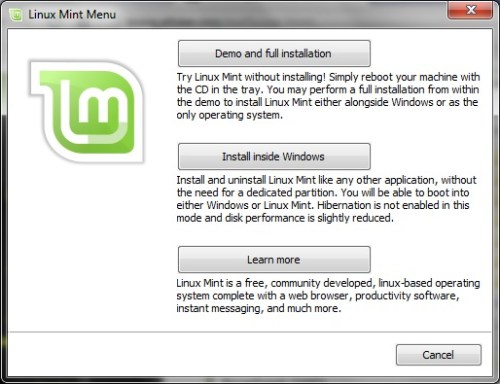
Instead, I used MagicISO CD/DVD manager, which virtually mounts an ISO as a CD/DVD drive. That took me to an option to install Linux Mint as part of Windows. Unfortunately, it forced me to uninstall the Wubi Kubuntu that I’d previously installed, but since that was broken anyway, I went ahead. I had to manually re-run mint4win.exe due to the kubuntu uninstall, then I could start the installation onto my local c:\.

LinuxMint - install1

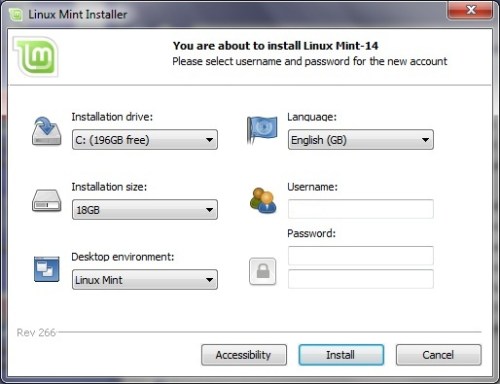
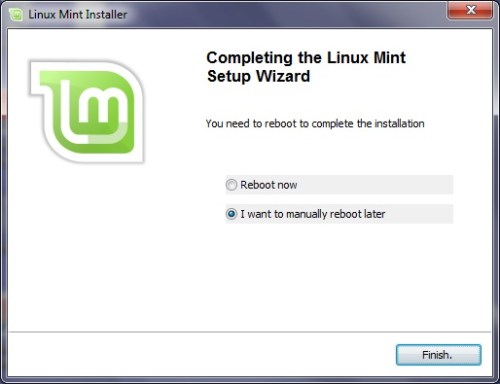
This installation only took a couple of minutes(*), then a mandatory re-boot, then voila. If I’d just run the installation directly from the ISO image instead of trying to burn a DVD and boot from it, this would have taken 10 minutes rather than 2 hours.

LinuxMint - install2

The Linux Mint desktop started without any manual editing in blacklist files (unlike when I installed Kubuntu last year). I didn’t have any trouble hooking up to Wifi either, just worked out of the box. My laptop is now dual-boot with Linux Mint v Windows 7 – not bad.

LinuxMint - install3

(*)Except – looks like that was only to run in Live mode (as if from the DVD). The give away was that it forgot my Wifi settings when I next booted into Linux. To actually install, I clicked on the “Install Linux Mint” desktop icon. The instructions were well explained in the handy user guide and only took about 15 minutes.

2 Comments

Filed under Programming, Technology

Regulating High Frequency Trading

Andrew Keller’s article Robocops: Regulating High Frequency Trading After the Flash Crash of 2010:

This emphasis on speed is the primary defining aspect to high frequency trading: it is the main difference between traditional investment management and HFT. It also distinguishes HFT from other algorithmic trading strategies. HFT is a subset of algorithmic trading, where both use programmed algorithms to execute automated order submissions and automated order management. However, it is common for a non-HFT algorithmic strategy to hold traded securities for days, weeks or months, whereas HFT traders usually end the trading day flat, with no significant holdings. Furthermore, ultra-fast trading speeds are not necessary in a non-HFT algorithmic strategy; HFT, on the other hand, uses strategies that require speed to gain advantages in the market.

“smoking” is an HFT scheme that exploits slow traders by offering attractive limit orders, then quickly revising these prices to take advantage of an unsuspecting slow trader’s market order.

Presumably, the exchanges know the players and have a better starting point than government regulators in attempting to understand HFT methods and strategies. HFT computers are also tied directly into the exchanges’ computer systems which provide the exchanges an advantage in compiling data. On the other hand, the exchanges have strong incentives to provide free reign to HFT traders: they earn high rents from co-location, and significant fees from large amounts of trading. The exchanges want HFT traders to continue playing a significant role in the markets, and may not be a reliable regulator.

Leave a comment

Filed under Finance

Alexandrescu Video – Three Optimization Tips for C++

Andrei Alexandrescu gave this talk on optimization tips for C++. He claims you should aim to:

  • Measure performance against a baseline
  • Choose algorithms that use the least heavyweight operations
  • Reduce array writes

The slides are also available.

Measuring gives you a leg up on experts who don’t need to measure

He also presents a handy ordering of different integral/floating point operations in terms of cost. The techniques (which he has internalised to give a gut feel of whether some improvement will produce a speed-up) are illustrated with a classic interview question (convert an integer to ascii) that is heavily used at Facebook.

The underlying message of this presentation is that the cost of one engineer spending time producing some pretty esoteric code with massive performance benefits is more than outweighed by the savings in terms of data centre costs (due to improved speed, you can scale back spend on servers).

Leave a comment

Filed under C++, Video

Choosing a new brand of Linux

I started trying to upgrade my Kubuntu installation so that I could use gcc 4.7 and test the portability of some C++11 code I’ve been writing. So far, it’s not good news – despite having upgraded gcc and Eclipse, the standard library hasn’t upgraded (/usr/lib/c++ only contains 4.6) and trying to install libstdc++ results in obscure error messages.

So the time has come to try a new Linux distribution. Going back a year or so, installing Kubuntu was a chore – my Vaio laptop’s graphics driver wasn’t recognised and I recall making some low-level changes to get it working. Therefore, my main priority is to pick a Linux distribution with easy installation and that hints at good hardware support.

This article talks about Fedora, Mint and Bodhi. Funny that this could be a case of ‘better the devil you know’ – I know an Ubuntu derivative was a pain last time, but at least I did find examples of other people having the same issue as me! I’d never heard of Bodhi before, but it sounds ideal – very fast to install and is an Ubuntu derivative so should support my Vaio hardware.

As for an IDE, I was never very impressed with Eclipse, so I’ll try something else. Each of Codeblocks, NetBeans and CodeLite get good comments.

Leave a comment

Filed under Programming, Technology

Human traders v robots

Mike O’Hara of HFTReview interviewed Prof Alex Preda about his research into how modern day retail investors are trading (free registration required to view the full article).

London traders are working and building models together with traders situated on the US East Coast or in the Mid West. They use social media intensively in order to combine and match their skills, to develop trading algorithms. This kind of work has become almost impossible for a single trader to sustain, so they build these small groups of maybe five or six people, situated in different locations, in different countries, all coordinating with each other in building and testing their robots. They’ve become very, very savvy.

Leave a comment

Filed under Finance

Lambda functions – recursion and other tricks

A few useful lambda function ideas, especially how to write a recursive lambda function in C++11:

Interestingly, lambdas can be recursive. For example, here’s a lambda that implements the fibonacci series using recursion:

function<int(int)> fib1 = [&fib1](int n) -> int
{
  if(n <= 2)
    return 1;
  else
    return fib1(n-1) + fib1(n-2);
}

Note that we had to actually name the lambda in order to implement the recursion. Without a name, how would you make the recursive call? This self-referencing places some restrictions on how a recursive lambda can be used; the lambda doesn’t refer to itself, it refers to fib1, which happens to be itself.

Leave a comment

Filed under C++

The optimizer – Google’s Jeff Dean

Really interesting article on the difference a ten-times-better programmer can make, plus some bogus Jeff Dean facts:

  • Compilers don’t warn Jeff Dean. Jeff Dean warns compilers.
  • Jeff Dean writes directly in binary. He then writes the source
    code as documentation for other developers.
  • When Jeff Dean has an ergonomic evaluation, it is for the protection of his keyboard.
  • Jeff Dean was forced to invent asynchronous APIs one day when he optimized a function so that it returned before it was invoked.

Leave a comment

Filed under Programming, Technology

Dr Dobbs article on software development for Obama’s campaign

Dr Dobbs wrote this article on the ways developing for an election campaign differ from typical projects.

“We realized early on that we had to understand that ‘good enough’ was indeed good enough. Often, 90% of the way there was the same as 100% and we just didn’t have the bandwidth to put a lot of time into the final 10% or polishing every last detail.”

The client wasn’t used to iterative development where they saw early incomplete releases of features.

The difference turned out to be crucial, as many features were changed in ways that became critical to their smooth operation on election day.

After the feature freeze in October,

No new features were added, unless mandated by regulation or indispensable to the operation. And in some cases, when an app didn’t work as hoped, team members reassessed its criticality and simply dumped the app if it was no longer truly essential.

At least they won’t have to do it all again for the next election, right? Wrong.

The team was unequivocal in its conviction that by 2016, all the code would have to be written from scratch again, due to change in technology and how people communicate. They saw no possibility of reusing their code. In fact, they felt that part of their opponents’ software difficulty was tied to reworking code from 2008, rather than writing the apps from scratch.

Leave a comment

Filed under Programming