F# Meetup – Microservices Chaos Testing

Meetup - Microservice Chaos TestingThis was the first event I’ve attended by the F#unctional Londoners group and the venue at Skillsmatter.com was excellent.
Some of the biggest growing pains we’ve experienced with our microservice architecture at Jet is in preparing for system outages.

In this talk, Rachel will discuss Jet.com’s chaos testing methods and code in depth, as well as lay out a path to implementation that everyone can use.

I haven’t used chaos testing in my own work, but in the world of distributed services, it makes sense to test the robustness of the system to failures on individual nodes. Rachel’s story was quite compelling, even if her own developers aren’t all convinced of the attractions of chaos testing on the production system just yet!

Leave a comment

Filed under F#, Meetup, Programming, Technology

Calculator App for Apple Watch

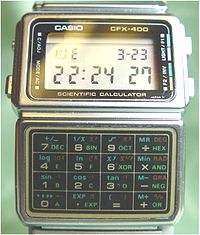
I was surprised that Apple didn’t include a calculator app with the Apple Watch. In the 1980’s, calculator watches were cool – having missed out then, I was keen for my Apple watch to have one.CasioCalculatorWatch

I chose to write my own calculator WatchKit App for fun, rather than purchasing one from the App Store. It’s a good choice for a first project, because the user interface is static and the focus is more on getting up the learning curve of WatchKit development. Here are some of the lessons I learnt in the process.

How to get the text from a WatchKit label
Suppose you’ve set up an outlet for a label that displays the input figures in your app – then you’d expect to be able to get the text back from it:

@IBOutlet var labelSum: WKInterfaceLabel!
//...
labelSum.setText( "42.0" )
let digits = labelSum.getText() // error - does not compile

It seems this is not supported in Xcode 7.2/Watch OS 2.1. Instead, you have to track the state in a variable and use that to populate the label.
How to store state in a WatchKit App
For a calculator App at least, you need a state machine to keep track of state, because at different stages you may be inputting the first or second number in the calculation, or re-using the previous answer in another calculation. Swift enum is a discriminated union that is well suited to this:

// Define enum type outside your interface controller
enum CalculationState
{
    case BuildingLHS( String )
    case BuildingRHS( LHS : String, Op : Operation, RHS : String ) // Waiting for Equals
    case WaitingForOperation( String ) // Got answer already, may do another operation
}

// Declare a variable to hold the state 
// as a member inside the interface controller class
class InterfaceController: WKInterfaceController {
    // ...
    var state : CalculationState
}

Use ‘RelativeToContainer’ to scale layout
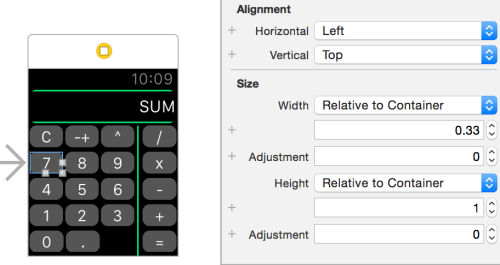
When defining the UI elements on your story board, the interface controller is only approximately the size of the watch screen. My UI has all the buttons displayed at once, so it’s important to make maximum use of the screen size.
Calc - RelativeToContainer
Here, buttons 7, 8 and 9 are in a horizontal group. To fill that container, we need to use the ‘RelativeToContainer’ scaling style and fill in the proportion each UI element should take. For height, it’s 1 (i.e. the whole container), whereas for width, it’s one third (i.e. 0.33-ish). Personally, I think it would have been more obvious that this is the scaling style to choose if the proportion was displayed as a percentage, rather than a value relative to one.
How to set completion after animation
The WatchKit animation API lacks the ability to specify a completion function that runs after the initial animation changes. This is awkward if you want to flash a UI element from one colour and return to the original colour – if you run both animations in parallel, the colour doesn’t change. I used this code to add an extension method – then I could easily flash UI elements as below:

    func flashSum( origColor : UIColor, flashColor : UIColor ){
        animateWithDuration(0.25,
            animations: { () -> Void in self.labelSum.setTextColor( flashColor ) },
            completion: { () -> Void in self.labelSum.setTextColor( origColor )}
        )
    }

How to run WatchKit App on hardwareThis should be as simple as plugging the hardware into your MacBook (i.e. the iPhone that’s paired to the Apple Watch), selecting the correct device from the devices list, then running the App in the debugger. However, there are numerous pitfalls:

  • You need either a developer licence or a personal team set up. See Team | Identity in the Project settings
  • Xcode may think that the iPhone and Watch are unpaired – restarting Xcode solved this one for me, other people have had to re-boot their watch and/or phone
  • Xcode may not have the symbols for your Watch OS (this happened after I updated to Watch OS 2.1) – however, it seems happy to download them once you connect to the internet

Re-booting, re-connecting the phone to the MacBook, re-starting Xcode eventually sorted this out.
Conclusion
I’d already worked through a couple of tutorials for writing WatchKit apps, but you learn far more by writing your own.
Calc On Watch
The end result looks great, although the buttons are slightly too small for frequent use, even on a 42mm Apple Watch.

1 Comment

Filed under Programming, Swift

IET Meetup: Turing Lecture 2016, The Internet of Me, Robert Schukai

IETLogoThis years Prestige Turing Lecture was given by Robert Schukai, Head of Applied Innovation for Thomson Reuters.

TuringTrustAn opening address was given by the great nephew of Alan Turing, on behalf of TuringTrust.co.uk. This organisation builds on the legacy of Turing by distributing pre-owned computing equipment, both in the UK and particularly to schools in Africa who have no facilities.

The lecture hall was completely sold out for this talk and the speaker lived up to his billing, giving a mixed media presentation with great passion and insight. He took the audience on a journey from the introduction and incredible growth of mobile technology, both in terms of number of users, speed of data transfer, and bulk of data stored annually. Then he showed that, with the advent of new applications such as Genomic Profiling, and/or the Internet of Things, today’s data footprint will be blitzed by that of the future.

He introduced Cognitive Computing by way of IBM’s Jon Iwata talking about Watson and Robert Schukaithen illustrated the rate of progress of Artificial Intelligence with reference to Google’s Deep Learning having mastered the game Go a full decade earlier than predicted.

Schukai’s vision for the near future is of “DayFlow“, a seamless user experience where their needs are met across devices, throughout the day, with content being proactively displayed just as the user needs it.

I suspect my iPhone is already there – it volunteers the Bus Timetable app first thing in the morning, just as I’m ready to leave for work.

Leave a comment

Filed under Meetup, Technology

Book Review: Angel’s Flight, Michael Connelly

AngelsFlightThis is another Harry Bosch thriller by Michael Connelly. This one is set at a period of time when Harry is married to Eleanor, but the marriage is in trouble. A bad time, then, to be assigned to a highly sensitive case which could trigger riots in the discontented city if handled injudiciously.

Bosch has to handle inter-departmental politics and work with a team headed by Chasten, his sworn enemy who has investigated his own conduct in the past. The case centres on the death of Elias, a celebrity lawyer known for taking, and usually winning, cases against the LAPD.

Harry is assisted by Kizmin Rider and Jerry Edgar, but has to watch out for a high-level leak from within the case. It’s a good read, though the background case of a murdered young girl is rather harrowing.
Three Stars

Leave a comment

Filed under Book Review

IET Meetup – Wireless Charging Buses in the UK

IETLogoThis is the first meeting I’ve been to at the IET since the refurbishment of the premises at Savoy Place, London.

Savoy Place

The location has always been amazing, but now the venue makes the most of it, with new entertainment space on the first floor leading to balconies that overlook the River Thames.

The presentation by Murat Basarir covered a Joint Venture by Arup and Mitsui to trial 8 electric buses on an urban bus route in Milton Keynes. The linear route is 24km long and takes about 50 minutes from one end to the other. Whilst they considered many battery charging options, they decided to install wireless charging plates into the road at the terminals, giving the bus 10 minutes to top-up before it turns round and runs the route in the opposite direction. There’s no need for the driver to physically plug in or swap batteries, so s/he gets a ten minute breaks, as per routine with diesel buses. The regular top-ups increase the range of the bus, so that it only needs a longer, trickle charge overnight back at the depot.

Leave a comment

Filed under Meetup, Technology

How to conditionally compile against different .NET framework versions in F#

I recently needed to supply two variations of an algorithm in an F# source file – one for .NET 3.5 consumers and another for .NET 4.0 consumers (the later framework version allows parallel execution using the FSharp.Collections.ParallelSeq). One way is to tell msbuild to reference the library, conditional on the version of the .NET framework – and also, define a constant which can be used within the source code to choose the algorithm.

In msbuild, define a constant according to the framework

<PropertyGroup Condition=" '$Framework' == 'NET35' ">
  <DefineConstants>NET35</DefineConstants>
</PropertyGroup>
<PropertyGroup Condition=" '$Framework' == 'NET40' ">
  <DefineConstants>NET40</DefineConstants>
</PropertyGroup>

In msbuild, reference library if .NET 4.0

<ItemGroup Condition=" '$Framework' == 'NET40' ">
  <Reference Include="FSharp.Collections.ParallelSeq"/>
</ItemGroup>

Specify conditional compilation directives in the source code

let doMapping = ... // some transformation
#if NET35
    items |> Seq.map doMapping
#else
    items |> FSharp.Collections.ParallelSeq.PSeq.map doMapping

Leave a comment

Filed under F#, Programming

Keyboard handling in Swift for iOS App

swiftI’ve updated my hobby project to take keyboard input. This ought to be pretty simple, but I came across a few snags that stopped the user experience being as smooth as should be.

Simulator only presents the pop-up keyboard once

This has been bothering me for a while, I resorted to switching to a different simulator profile (e.g. iPhone 4s / iPhone 5). It turns out that, by typing into the laptop keyboard instead of tapping the UI keyboard, the switch to hardware keyboard was semi-permanent. As per this StackOverflow page, you can restore the keyboard by in the Similar by Hardware -> Keyboard -> Toggle Software Keyboard (or ⌘K).

How to change the pop-up keyboard to ‘Done’

By default, the pop-up keyboard shows the enter/return key as “Return”. For some instances, you want to change that – this is as simple as changing the “Return Key” property on the text field in the story board:
ReturnKeyAppearance

How to dismiss keyboard when user presses return key

By default, the software keyboard does not disappear when you tap return (either on the hardware keyboard or on the software keyboard). There are several steps to achieve this, which are well discussed on StackOverflow. There are a couple of implementations choices for textFieldShouldReturn, this one worked for me:

    // UITextFieldDelegate implementation
    func textFieldShouldReturn(textField: UITextField) -> Bool {
        self.view.endEditing(true)
        return false
    }

coupled with the change below for leaving the text field.

How to dismiss keyboard when user leaves the text field

Another obvious feature I wanted is to dismiss the keyboard if the user taps elsewhere in the App. The key here is to tell the view to recognise a tap (that is, UITapGestureRecognizer). See ‘Close iOS keyboard by touching anywhere’ on StackOverflow discussion.

Leave a comment

Filed under Programming, Swift

Tech Book: Swift for the Really Impatient, Matt Henderson & Dave Wood

SI love the title of this book, the authors kept the content as concise as possible and showed that it really is possible to give a decent introduction to a programming language in just 156 pages (and less than 1cm). The book is quite practical you can read it cover-to-cover to pick up the features of the language, then you can use the handy code snippets as a quick reference guide (and the index is pretty good for this too, not always the case).

I bought a 2015 edition, the only downside being that this seems to be aimed at Xcode 6 and is now slightly out of date. With Swift being an evolving language, that’s to be expected – some readers might prefer to work with the electronic copy and remain up to date.

It’s also worth mentioning that, if your aim is to write a simple iOS app in Swift, you might be better off working through a tutorial and learning Swift that way, along with picking up tips and tricks for working with Xcode. See FoodTracker and To Do.
Five Stars

Leave a comment

Filed under Programming, Swift, Tech Book

Scott Meyers – Good to go

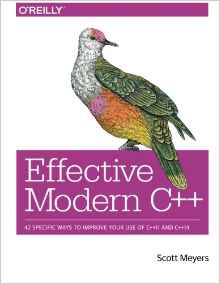
I just read that Scott Meyers has announced he is stepping back from active involvement with C++.   I’ve been a big fan of Scott’s work, I attended his C++ training sessions at DevWeek, London in the late 90’s, and I’ve read his Effective C++|More C++|STL books – except for the most recent one, his take on Effective Modern C++. My copy is now on order. 

Leave a comment

Filed under C++, Programming

Book Review: Make Me, Lee Child

Make Me, Lee ChildThis is the 2015 Jack Reacher thriller which I received in a lovely hard back edition for Christmas. I was lucky to hear an interview with author Lee Child on radio 5Live last year, which ended with a reading from this book. It also revealed some interesting facts about the author:

  • He starts work on a new book on September 1st every year, a superstition based on the success of his first book “Killing Floor”
  • He was born in England (and went to the same school as one of my colleagues) but lives in America and writes in American English
  • His books often switch between narration in the first and third person, the former allowing Jack Reacher to speak for himself, the latter to allow scenes where Reacher is not present
  • He hints that he may end the series of Reacher novels after 21 books, based on some series he read as a young man that seemed about the right length
  • He doesn’t plan the whole book before writing it – this way, he doesn’t know what’s about to happen either and it’s more exciting (!)

Reacher has Chang for an accomplice, a beautiful ex-FBI agent, who is searching for her colleague Keever who disappeared – last known location, Mother’s Rest near Oklahoma City. The underlying mystery is one of the deepest in the series – in fact, it’s a long way into the book before we have a clue what is going on in the town of Mother’s Rest, and there’s still time for a plot twist at the end.

Will this be the penultimate book in the series? Jack Reacher shows vulnerability in this one, he’s actually hurt physically and that could carry into the next book. He also grows more attached to Chang than is usual and perhaps she’ll appear in the next book too – maybe he’ll settle down to a more stable investigative partnership (with benefits)? If he’s on schedule, then Lee Child has already started the book and may even know some of the answers.

Four stars

2 Comments

Filed under Book Review