Category Archives: Programming

How to write Extension Methods in F# and Swift

I’ve used extension methods for a while in F# as a neat way of adding utility methods to system types. For example, suppose you have a set and want to add some elements to it? You might write something like this:

  let collection = ... // initial set defined elsewhere
  let collection = // add extra elements into collection
    [| 1; 2; 3 |] |> Array.fold (fun (acc : Set<'T>) item -> acc.Add item) collection

You might find yourself writing this snippet frequently and for different container types. Instead of defining the operation every time, it’s better to write an extension method:

namespace MusingStudio.Extensions
module Set =
  let AddMulti (items : seq<'T>) (collection : Set<'T>) =
    items |> Seq.fold (fun (acc : Set<'T>) item -> acc.Add item) collection

Then, by bringing the extensions into scope, we can call AddMulti as if it were part of the system Set interface:

open MusingStudio.Extensions

[<EntryPoint>]
let main argv = 
    let initial = [| 1; 2; 3 |] |> Set.ofArray
    let updated = initial |> Set.AddMulti [| 4; 5; 6 |]
    printfn "%A" updated
    0 // return an integer exit code

I was looking for a way to get the current time/date in Swift, and found some code on Stack Overflow that uses Extension Methods to do it. I’ve added a couple more methods to get the seconds and day-of-month:

import Foundation

// From: http://stackoverflow.com/questions/24070450/how-to-get-the-current-time-and-hour-as-datetime
extension NSDate
{
    func hours() -> Int
    {
        //Get Hours
        let calendar = NSCalendar.currentCalendar()
        let components = calendar.components(.Hour, fromDate: self)
        let hours = components.hour
        
        //Return Hour
        return hours
    }
    
    func minutes() -> Int
    {
        //Get Minutes
        let calendar = NSCalendar.currentCalendar()
        let components = calendar.components(.Minute, fromDate: self)
        let minutes = components.minute
        
        //Return Minute
        return minutes
    }
    
    func seconds() -> Int
    {
        // Get Seconds
        let calendar = NSCalendar.currentCalendar()
        let components = calendar.components(.Second, fromDate: self)
        let seconds = components.second
        
        return seconds
    }
    
    func day() -> Int
    {
        // Get Day
        let calendar = NSCalendar.currentCalendar()
        let components = calendar.components(.Day, fromDate: self)
        let day = components.day
        
        return day
    }
}

This simplifies the interface to NSDate:

  // Get the time properties
  let currentDate = NSDate()
  let minutes = currentDate.minutes()
  let hours = currentDate.hours()
  let seconds = currentDate.seconds()
  let dayOfMonth = currentDate.day()

2 Comments

Filed under F#, Programming, Swift

C++17 News

Herb Sutter blogged about the Oulo ISO C++ meeting. There’s a link to an interview he did for the excellent CppCast podcast and also to a reddit post on features approved at the meeting.
CppCast

As Herb called out in the interview, I think the following two features will be widely used:
Structured Bindings
This is interesting because I’ve been using the std::tie syntax for a while, despite the clumsiness when you need to introduce new variables to take the return types (leaving them uninitialised until assignment). The proposal above avoids that problem.

tuple<T1,T2,T3> f(/*...*/) { /*...*/ return {a,b,c}; }

// BEFORE
T1 x;
T2 y;
T3 z;
std::tie( x, y, z ) = f();

// AFTER
auto [x,y,z] = f(); // x has type T1, y has type T2, z has type T3

Initialisation clause for if and switch
This proposal makes if/switch more consistent with for loops that allow separate initialisation/increment clauses as well as a condition. So now you can initialise a variable separately from the if condition, which also allows you to limit the scope of that variable.

// BEFORE
status_code c = bar();     
if (c != SUCCESS) 
{       
    return c;     
}

// AFTER
if (status_code c = bar(); c != SUCCESS) 
{     
  return c;   
}

Leave a comment

Filed under C++, Programming

How to initialise data concisely in C++

In the past, creating a collection of dates was a chore, because you had to individually insert them into a container (e.g. declaring a vector on one line and then pushing dates into it on subsequent lines). With features like std::initializer_list from C++11 onwards, it’s now much easier to do this concisely.

Here’s some simple, concise code to create dates without all the hassle:

struct Date
{
    std::string Event;

    int Year;
    int Month;
    int Day;
};

void print( const Date& date )
{
    std::cout << date.Event << ": "<< date.Year << "/" << date.Month << "/" << date.Day << "\n";
}

void print( const std::vector<Date>& dates )
{
    for ( auto date : dates )
    {
        print( date );
    }
}

void test()
{
    std::cout << "Print date:\n";
    print( { "Today", 2015, 5, 5 } );

    std::cout << "Print dates:\n";
    print( {
        { "Christmas", 2015, 12, 25 },
        { "Spring Bank Holiday", 2016, 6, 30 }
           } );
}

This style is particularly useful when writing tests – you can write a whole test, including setting up the data, on a single line (or at least, in a single function call).

Another compelling use case comes when creating test cases for graph algorithms. Suppose you have the following data structures for an undirected, weighted graph:

struct Edge
{
    const size_t end1;
    const size_t end2;
    const size_t cost;
};

struct Graph
{
    size_t source;
    size_t nodes;
    std::vector<Edge> edges;
};

Then creating a test graph to pass into an algorithm is as simple as:

shortest_path( { 0, 4, { {0,1,24}, {0,3,20}, {2,0,3}, {3,2,12} } })

Leave a comment

Filed under C++, C++ Code, Programming

How to efficiently find the n’th biggest element in a collection

Looking at std::nth_element the other day, I noticed that it’s complexity is O(n) for a collection of size n, and wondered how that was achieved. A basic implementation of an algorithm to find the ith-biggest element might start by sorting the collection and index to the ith afterwards – complexity O(n*log(n)):

int ith_element_by_sorting( std::vector<int> input, int i )
{
    std::sort( std::begin(input), std::end(input) );
    return input[i];
}

It’s a small step to realise then that you don’t need to sort all n elements of the collection – only the first i elements, so complexity O(n*log(i)):

int ith_element_by_partial_sort( std::vector<int> input, int i )
{
    std::partial_sort( std::begin( input ), std::begin( input ) + i + 1, std::end( input ) );
    return input[i];
}

But the real trick is that you don’t need to do any sorting at all. That’s the approach taken by quickselect, which is the selection sibling to quicksort, and achieves O(n) complexity on average:

int partition( std::vector<int>& values, int left, int right, int pivot )
{
     auto pivotValue = values[ pivot ];

     std::swap( values[pivot], values[right] ); // Move pivot to end
     auto store_pos = left;

     for ( int j = left; j < right; ++j )
     {
         if ( values[j] < pivotValue )
         {
             std::swap( values[ store_pos ], values[j] );
             ++store_pos;
         }
     }

     std::swap( values[right], values[ store_pos ] );  // Move pivot to its final place

     return store_pos;
}

int quickselect( std::vector<int> values, int left, int right, int i )
{
    // Unordered - no need to sort values at all, 
    // instead we recursively partition only the subset of values
    // containing the i'th element, until we have either
    // a) trivial subset of 1
    // b) pivot is moved to exactly the location we wanted 
    while( 1 )
    {
         if ( left == right )
         {
             return values[left];
         }

         // Pick a pivot from middle of values.
         // Better options are a random pivot or median of 3
         auto pivot = (left + right)/2; 

         // Move anything smaller than values[pivot] to the left of pivot,
         // and return updated position of pivot
         pivot = partition( values, left, right, pivot );

         if ( pivot == i )
         {
             return values[i];
         }
         else if ( i < pivot )
         {
             right = pivot - 1;
         }
         else
         {
             left = pivot + 1;
         }
    }
}

int ith_element_by_quickselect( const std::vector<int>& input, int i )
{
    return quickselect( input, 0, input.size()-1, i );
}

int ith_element( const std::vector<int>& input, int i )
{
    if ( i < 0 || i >= input.size() )
    {
        std::ostringstream ss;
        ss << "Input '" << i << "' outside range [0," << input.size() << ")";
        throw std::out_of_range( ss.str() );
    }

    return ith_element_by_quickselect( input, i );
}

Here’s some test code to check that the implementation works:

template <typename F, typename T>
void should_be( T t, F f, const std::string& message )
{
    try
    {
        std::ostringstream ss;

        auto got = f();
        if ( got != t )
        {
            ss << message << " got " << got << ", expected " << t;
            throw std::runtime_error( ss.str() );
        }
        else
        {
            ss << "OK: " << message << ": got " << got;
            std::cout << ss.str() << "\n";
        }
    }
    catch( const std::exception& ex )
    {
        // Report error if either f() threw or we found unexpected value
        std::cout << "ERROR: " << ex.what() << "\n";
    }
}

template <typename F>
void should_throw( F f, const std::string& message )
{
    try
    {
        f();
    }
    catch( const std::exception& ex )
    {
        std::cout << "OK: " << message << ": threw \"" << ex.what() << "\"\n";
        return;
    }

    std::cout << "ERROR: " << message << " should have thrown\n";
}

#define SHOULD_BE( t, expr ) should_be( t, [](){ return expr; }, #expr )
#define SHOULD_THROW( expr ) should_throw( [](){ expr; }, #expr )

void testIthElement()
{
    SHOULD_THROW( ith_element( {}, 0 ) );
    SHOULD_THROW( ith_element( {1,2}, -1 ) );
    SHOULD_THROW( ith_element( {1,2,3}, 3 ) );

    SHOULD_BE( 1, ith_element( {1}, 0 ) );
    SHOULD_BE( 0, ith_element( {0,1,2,3,4,5,6,7,8}, 0 ) );
    SHOULD_BE( 2, ith_element( {0,1,2,3,4,5,6,7,8}, 2 ) );
    SHOULD_BE( 6, ith_element( {5,4,7,6,1,2,0,8,3}, 6 ) );
    SHOULD_BE( 8, ith_element( {5,4,7,6,1,2,0,8,3}, 8 ) );
    SHOULD_BE( 5, ith_element( {5,5,5,5,5,5}, 1 ) );
}

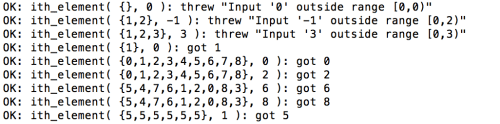
Here’s the output:
QuickSelect

In fact, reviewing old posts on this blog, I found this link that dates back to 2013, when std::nth_element was only required by the standard to have worst-case O(N^2) complexity, with O(N) on average – precisely what you’d get from quickselect. Now though, thanks to introselect, O(N) is possible.

Leave a comment

Filed under C++, C++ Code, Programming

Tech Book: Effective Modern C++, Scott Meyers

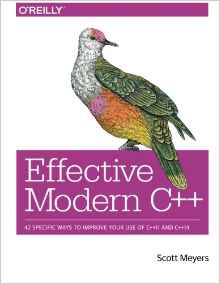
EffectiveModernC++When Scott Meyers announced his retirement from C++ duties, I thought I’d get a copy of his latest book. There’s plenty in it to interest even seasoned C++ developers – as always, Scott’s insight and in-depth examples are worth studying. I’ve tried out most of the C++11 features, but still learnt a lot working through this book.

Uniform Initialisation and Auto
Meyers points out that compared to parentheses or just plain “=”, braced initialisation can be used in the most contexts, avoids his famous “C++’s most vexing parse”, and will issue compiler errors if narrowing occurs. However, for types that can take a std::initialiser_list in their constructor, the compiler is required to favour std::initialiser_list over any other interpretation. That’s a deterrent to use of braced initialisation with types that have a std::initializer_list constructor – and also precludes using auto with braced initialisation.

auto x = { 4 }; // type of x is inferred to be std::initializer_list&lt;int&gt;!

How to use the new “= delete” idiom
Meyers recommends declaring deleted methods as public to get better error messages from compilers that check for accessibility before deleted status. He also points out that you can declare non-member functions as deleted (I’d only seen examples of copy-constructor/copy-assignment operator as deleted before).

Use of noexcept on move operations
This one is a classic example of a combination of language features having an unexpected effect. std::vector::push_back offers the strong exception guarantee. It can achieve this using any copy constructor and being sure not to change the original contents of the vector until any new elements or copies have been constructed. Hence, move constructors are only preferred if it is exception-safe to do so – which means they must be marked as noexcept (and if that isn’t appropriate, you just won’t get move semantics pushing instances of your type into a std::vector).

Recursion with constexpr
Having toyed with template meta-programming in the past, this use of constexpr appeals to me:

constexpr int pow( int b, int exp ) noexcept
{
    return (exp == 0 ? 1 : b * pow( b, exp-1 ));
}
constexpr auto eight = pow( 2, 3 );

void testConstExpr()
{
    std::cout &lt;&lt; &quot;2^3 = &quot; &lt;&lt; eight &lt;&lt; &quot;\n&quot;;
}

It’s much more succinct than the equivalent TMP version, and still performs the calculation at compile time.

Summary
In the past, I’ve recommended Effective C++ for developers who have little experience of the language and wish to improve their skills. I think this book is a bit too advanced for that, particularly given the chapters on template type deduction and decltype being in the first part of the book! So read this book if you’ve got a few years’ experience of C++ already, but look at Effective C++ (3rd Edition) to improve on the basics.

Four stars

Leave a comment

Filed under C++, C++ Code, Programming, Tech Book

C++14 Language Extensions

Whilst reading Scott Meyers’ Effective Modern C++, I was looking for some clarification on ‘generalised lambda capture’ and came across this C++ 14 feature list. It was interesting to compare to the list of expected features that Bjarne Stroustrup presented at the ACCU 2013 conference – he described all of the following, which made it into C++14:

  • Generalised return type deduction for normal functions, not just lambdas
  • Generic (polymorphic) lambdas
  • Generalised constexpr functions (listed as Extended constexpt on the feature list)
  • Binary Literals
  • Digit Separators
  • Deprecated Attribute

However, this one appears not to have made the cut:

  • Runtime-sized arrays

This would be a great new feature and I blogged about it at the time – but it appears the work has stalled.

Leave a comment

Filed under C++, Programming

F# Meetup – Microservices Chaos Testing

Meetup - Microservice Chaos TestingThis was the first event I’ve attended by the F#unctional Londoners group and the venue at Skillsmatter.com was excellent.
Some of the biggest growing pains we’ve experienced with our microservice architecture at Jet is in preparing for system outages.

In this talk, Rachel will discuss Jet.com’s chaos testing methods and code in depth, as well as lay out a path to implementation that everyone can use.

I haven’t used chaos testing in my own work, but in the world of distributed services, it makes sense to test the robustness of the system to failures on individual nodes. Rachel’s story was quite compelling, even if her own developers aren’t all convinced of the attractions of chaos testing on the production system just yet!

Leave a comment

Filed under F#, Meetup, Programming, Technology

Calculator App for Apple Watch

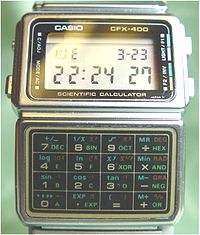
I was surprised that Apple didn’t include a calculator app with the Apple Watch. In the 1980’s, calculator watches were cool – having missed out then, I was keen for my Apple watch to have one.CasioCalculatorWatch

I chose to write my own calculator WatchKit App for fun, rather than purchasing one from the App Store. It’s a good choice for a first project, because the user interface is static and the focus is more on getting up the learning curve of WatchKit development. Here are some of the lessons I learnt in the process.

How to get the text from a WatchKit label
Suppose you’ve set up an outlet for a label that displays the input figures in your app – then you’d expect to be able to get the text back from it:

@IBOutlet var labelSum: WKInterfaceLabel!
//...
labelSum.setText( "42.0" )
let digits = labelSum.getText() // error - does not compile

It seems this is not supported in Xcode 7.2/Watch OS 2.1. Instead, you have to track the state in a variable and use that to populate the label.
How to store state in a WatchKit App
For a calculator App at least, you need a state machine to keep track of state, because at different stages you may be inputting the first or second number in the calculation, or re-using the previous answer in another calculation. Swift enum is a discriminated union that is well suited to this:

// Define enum type outside your interface controller
enum CalculationState
{
    case BuildingLHS( String )
    case BuildingRHS( LHS : String, Op : Operation, RHS : String ) // Waiting for Equals
    case WaitingForOperation( String ) // Got answer already, may do another operation
}

// Declare a variable to hold the state 
// as a member inside the interface controller class
class InterfaceController: WKInterfaceController {
    // ...
    var state : CalculationState
}

Use ‘RelativeToContainer’ to scale layout
When defining the UI elements on your story board, the interface controller is only approximately the size of the watch screen. My UI has all the buttons displayed at once, so it’s important to make maximum use of the screen size.
Calc - RelativeToContainer
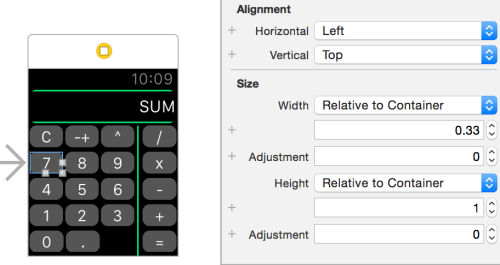
Here, buttons 7, 8 and 9 are in a horizontal group. To fill that container, we need to use the ‘RelativeToContainer’ scaling style and fill in the proportion each UI element should take. For height, it’s 1 (i.e. the whole container), whereas for width, it’s one third (i.e. 0.33-ish). Personally, I think it would have been more obvious that this is the scaling style to choose if the proportion was displayed as a percentage, rather than a value relative to one.
How to set completion after animation
The WatchKit animation API lacks the ability to specify a completion function that runs after the initial animation changes. This is awkward if you want to flash a UI element from one colour and return to the original colour – if you run both animations in parallel, the colour doesn’t change. I used this code to add an extension method – then I could easily flash UI elements as below:

    func flashSum( origColor : UIColor, flashColor : UIColor ){
        animateWithDuration(0.25,
            animations: { () -> Void in self.labelSum.setTextColor( flashColor ) },
            completion: { () -> Void in self.labelSum.setTextColor( origColor )}
        )
    }

How to run WatchKit App on hardwareThis should be as simple as plugging the hardware into your MacBook (i.e. the iPhone that’s paired to the Apple Watch), selecting the correct device from the devices list, then running the App in the debugger. However, there are numerous pitfalls:

  • You need either a developer licence or a personal team set up. See Team | Identity in the Project settings
  • Xcode may think that the iPhone and Watch are unpaired – restarting Xcode solved this one for me, other people have had to re-boot their watch and/or phone
  • Xcode may not have the symbols for your Watch OS (this happened after I updated to Watch OS 2.1) – however, it seems happy to download them once you connect to the internet

Re-booting, re-connecting the phone to the MacBook, re-starting Xcode eventually sorted this out.
Conclusion
I’d already worked through a couple of tutorials for writing WatchKit apps, but you learn far more by writing your own.
Calc On Watch
The end result looks great, although the buttons are slightly too small for frequent use, even on a 42mm Apple Watch.

1 Comment

Filed under Programming, Swift

How to conditionally compile against different .NET framework versions in F#

I recently needed to supply two variations of an algorithm in an F# source file – one for .NET 3.5 consumers and another for .NET 4.0 consumers (the later framework version allows parallel execution using the FSharp.Collections.ParallelSeq). One way is to tell msbuild to reference the library, conditional on the version of the .NET framework – and also, define a constant which can be used within the source code to choose the algorithm.

In msbuild, define a constant according to the framework

<PropertyGroup Condition=" '$Framework' == 'NET35' ">
  <DefineConstants>NET35</DefineConstants>
</PropertyGroup>
<PropertyGroup Condition=" '$Framework' == 'NET40' ">
  <DefineConstants>NET40</DefineConstants>
</PropertyGroup>

In msbuild, reference library if .NET 4.0

<ItemGroup Condition=" '$Framework' == 'NET40' ">
  <Reference Include="FSharp.Collections.ParallelSeq"/>
</ItemGroup>

Specify conditional compilation directives in the source code

let doMapping = ... // some transformation
#if NET35
    items |> Seq.map doMapping
#else
    items |> FSharp.Collections.ParallelSeq.PSeq.map doMapping

Leave a comment

Filed under F#, Programming

Keyboard handling in Swift for iOS App

swiftI’ve updated my hobby project to take keyboard input. This ought to be pretty simple, but I came across a few snags that stopped the user experience being as smooth as should be.
Simulator only presents the pop-up keyboard once

This has been bothering me for a while, I resorted to switching to a different simulator profile (e.g. iPhone 4s / iPhone 5). It turns out that, by typing into the laptop keyboard instead of tapping the UI keyboard, the switch to hardware keyboard was semi-permanent. As per this StackOverflow page, you can restore the keyboard by in the Similar by Hardware -> Keyboard -> Toggle Software Keyboard (or ⌘K).

How to change the pop-up keyboard to ‘Done’

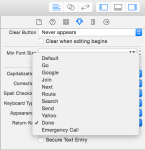
By default, the pop-up keyboard shows the enter/return key as “Return”. For some instances, you want to change that – this is as simple as changing the “Return Key” property on the text field in the story board:
ReturnKeyAppearance

How to dismiss keyboard when user presses return key

By default, the software keyboard does not disappear when you tap return (either on the hardware keyboard or on the software keyboard). There are several steps to achieve this, which are well discussed on StackOverflow. There are a couple of implementations choices for textFieldShouldReturn, this one worked for me:

    // UITextFieldDelegate implementation
    func textFieldShouldReturn(textField: UITextField) -> Bool {
        self.view.endEditing(true)
        return false
    }

coupled with the change below for leaving the text field.

How to dismiss keyboard when user leaves the text field

Another obvious feature I wanted is to dismiss the keyboard if the user taps elsewhere in the App. The key here is to tell the view to recognise a tap (that is, UITapGestureRecognizer). See ‘Close iOS keyboard by touching anywhere’ on StackOverflow discussion.

Leave a comment

Filed under Programming, Swift