In recent years, I’ve found myself writing less user interface code and more server code (typically COM servers that are exercised on client workstations or on nodes in a compute farm). Given the lack of a UI for driving and testing the code (excepting spreadsheets), automated tests are vital to achieve a high degree of code coverage.

Given that I’ve been doing this for years now, I was surprised to learn that I haven’t been writing unit tests, as I previously supposed. According to The Art of Unit Testing, the tests I’ve been writing are typically interaction tests. These are useful too, but unless a component can be tested in isolation with tests that run without delay due to network/database interaction, it isn’t a unit test.
Since reading the book, I’ve adopted the Google Test framework for both writing unit tests and implementing mock objects to accompany the tests. Without a good library for writing mock objects, you’re dragged straight back in to writing tests that call other objects in your library. With GMock, you can easily create mock objects and inject behaviour into them in order to test your server code in various scenarios. Using GTest and GMock is easy – just call RUN_ALL_TESTS() in main, and the framework discovers all the unit test you’ve written and launches them:
#include "gmock\gmock.h"
using namespace testing;

// Start writing unit tests here!

int _tmain(int argc, _TCHAR* argv[])
{
    ::InitGoogleMock( &argc, argv );
    return RUN_ALL_TESTS();
}
Here’s a simple example that defines a WeatherStation interface and a UserInterface class. We wish to test the UserInterface, but the weather station isn’t written yet – so we define a MockWeatherStation, and set up tests to invoke the UserInterface in different situations:
#include "gmock\gmock.h"

#include <iostream>
#include <list>
#include <memory>

class WeatherStation
{
public:
    virtual ~WeatherStation(){};

    typedef enum
    {
        North, South, East, West
    } Direction;

    typedef enum
    {
        Optimistic, Pessimistic
    } Outlook;

    // NB Semantics on wind deliberately ugly to show a neat feature in gmock
    virtual void wind( Direction* pDirection, double* strength ) const = 0;
    virtual double rainfall() const = 0;
    virtual std::string prediction( Outlook outlook ) const = 0;
};

class UserInterface
{
public:
    UserInterface( const std::shared_ptr<WeatherStation>& weather_station ) :
        weather_station_( weather_station )
    {
    }

    typedef enum
    {
        Heavy, Medium, Light
    } Range;

    Range rain()
    {
        auto rainfall = weather_station_->rainfall();
        if ( 0.0 <= rainfall && rainfall < 2.0 ) return Light;
        else if ( 2.0 <= rainfall && rainfall < 4.0 ) return Medium;
        else return Heavy;
    }

    Range wind()
    {
        WeatherStation::Direction direction;
        double strength;
        weather_station_->wind( &direction, &strength );

        if ( 0.0 <= strength && strength < 5.0 ) return Light;
        else if ( 5.0 <= strength && strength < 10.0 ) return Medium;
        else return Heavy;
    }

    std::pair<std::string, std::string> predict_range()
    {
        return std::make_pair(
            weather_station_->prediction( WeatherStation::Optimistic ),
            weather_station_->prediction( WeatherStation::Pessimistic ) );
    }

private:
    std::shared_ptr<WeatherStation> weather_station_;
};

using namespace testing;

class MockWeatherStation : public WeatherStation
{
public:
    MOCK_CONST_METHOD0( rainfall, double() );
    MOCK_CONST_METHOD2( wind, void(WeatherStation::Direction*, double*) );
    MOCK_CONST_METHOD1( prediction, std::string( WeatherStation::Outlook ) );
};

TEST( WeatherStationUserInterface, rain_should_be_heavy )
{
    auto weather_station = std::make_shared<MockWeatherStation>();
    // GMock: specify a simple return value using Return(x)
    // Here, part of the test is that the Mock should be called once,
    // hence the 'WillOnce' call (more than one call would be an error).
    // If multiple calls should happen during the test,
    // use 'WillRepeatedly' instead.
    EXPECT_CALL( *weather_station, rainfall() )
        .WillOnce( Return(5.0) );
    UserInterface ui( weather_station );
    EXPECT_EQ( UserInterface::Heavy, ui.rain() );
}

TEST( WeatherStationUserInterface, wind_should_be_light )
{
    auto weather_station = std::make_shared<MockWeatherStation>();
    // GMock: specify out parameter values using SetArgPointee
    EXPECT_CALL( *weather_station, wind(_,_) )
        .WillOnce( DoAll( SetArgPointee<0>( WeatherStation::North ),
                          SetArgPointee<1>( 0.5 )) );
    UserInterface ui( weather_station );
    EXPECT_EQ( UserInterface::Light, ui.wind() );
}

TEST( WeatherStationUserInterface, predictions_are_displayed )
{
    auto weather_station = std::make_shared<MockWeatherStation>();
    // GMock: inject more complex logic using C++11 lambdas,
    // and pattern match on the input value
    EXPECT_CALL( *weather_station, prediction(WeatherStation::Optimistic) )
        .WillOnce( Invoke( []( WeatherStation::Outlook _ ) -> std::string
            {
                return "Sunny";
            }) );
    EXPECT_CALL( *weather_station, prediction(WeatherStation::Pessimistic) )
        .WillOnce( Invoke( []( WeatherStation::Outlook _ ) -> std::string
            {
                return "Overcast";
            }) );

    UserInterface ui( weather_station );
    auto predicted_range = ui.predict_range();
    EXPECT_EQ( "Sunny", predicted_range.first );
    EXPECT_EQ( "Overcast", predicted_range.second );
}
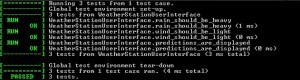
When you run the executable, it’s easy to spot if the tests pass or fail:
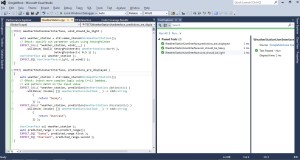
As a bonus, Visual Studio 2012 has neat integration for GoogleTest:
See also


 musingstudio