Category Archives: Technology

WordPress App mangles my code!

I’ve noticed that whenever I use the WordPress App on my iPhone or iPad to edit a technical post that includes some code, the snippet I’ve carefully slaved over gets mangled. In particular, anything that uses templates in C++ (or generics in F#) will be affected, for example

vector<int> myData;

becomes

vector; myData;

The only answer at the moment is to be disciplined and restrict myself to editing code-based posts in the Web editor, which doesn’t destroy my content.

1 Comment

Filed under C++, Technology

How to recover a dead iPhone

I got out my my iPhone this evening and it was dead.  No response from it, not even when I plugged it in to the mains (which has worked before when the battery ran out of charge).  Attaching to a PC via USB did not revive it either.  Very mysterious, given that it was working just fine on the way home from work.

Fortunately, this post had the answer – hold down the Power button and Home (square) button until the Apple logo appears.  And you have to believe – no point counting to ten and giving up, really believe and the iPhone will come back to life.  Worked for me (after 14 seconds).  This article has even more tips in case the first doesn’t work.

Some might say that any hardware that relies on the user to google an obscure combination of buttons to turn on their phone has a screw loose – but I’m just happy to have my phone back.

Leave a comment

Filed under Technology

NFC key to the future

Clever new uses for NFC-enabled phones.

Leave a comment

Filed under Technology

How to pull water out of thin air

Amazing article on an engineering project

20130305-190014.jpg

with real social benefits.

Leave a comment

Filed under Technology

How to recover accidentally deleted files

I was over-zealous when clearing space on my hard disk and accidentally deleted a project that wasn’t completely under source control. Fortunately, WinUndelete came to the rescue. It finds files that weren’t even in the recycle bin and allows you to restrict the search to only the file extensions you need (making it much faster than some competitor products). The restore worked perfectly – although the display of the found files wasn’t that pretty, it did the job. My only gripe was the cost – $49.95 seems pretty high when I only needed two files. Still, it was worth it to avoid repeating half a day of development.

Leave a comment

Filed under Technology

Apple SmartWatch – yes please!

When I awoke this morning, I didn’t know that I wanted a smart watch. Having read this article, though, I’ve realised my set of gadgetry won’t be complete until I get one. The reviews of the currently available smart watches weren’t very complimentary, so I’ll wait to see what Apple come up with.

Leave a comment

Filed under Technology

Silent Circle launches new encryption app

Silent Circle have announced a new encryption app:

The technology uses a sophisticated peer-to-peer encryption technique that allows users to send encrypted files of up to 60 megabytes through a “Silent Text” app.

“We feel that every citizen has a right to communicate,” Janke says, “the right to send data without the fear of it being grabbed out of the air and used by criminals, stored by governments, and aggregated by companies that sell it.”

I can see the practical value in this (for example, if you need to send sensitive documents from work to home), as well as the human rights slant that the article explores.

Leave a comment

Filed under Technology

Installing Linux Mint

I’ve decided to install a new flavour of Linux, as mentioned in my earlier post. Even choosing Mint ahead of Fedora and Bodhi hasn’t narrowed down the choices sufficiently – I then had to choose between the KDE, Xfce and vanilla versions. Then for the vanilla, you have to choose MATE or Cinnamon!

Having opted for the vanilla, Cinnamon version, I downloaded the ISO file and burned it to a DVD. Now the fun part – my Sony Vaio does not have an optical drive, but I have an external one so wired it up. Then, I had to boot up the laptop, press F2 to edit the BIOS and a) enable booting from external device b) put external device before the hard disk in the boot order. But I still couldn’t install from the Boot disk – it just wasn’t recognized when booting.

Instead, I used MagicISO CD/DVD manager, which virtually mounts an ISO as a CD/DVD drive. That took me to an option to install Linux Mint as part of Windows. Unfortunately, it forced me to uninstall the Wubi Kubuntu that I’d previously installed, but since that was broken anyway, I went ahead. I had to manually re-run mint4win.exe due to the kubuntu uninstall, then I could start the installation onto my local c:\.
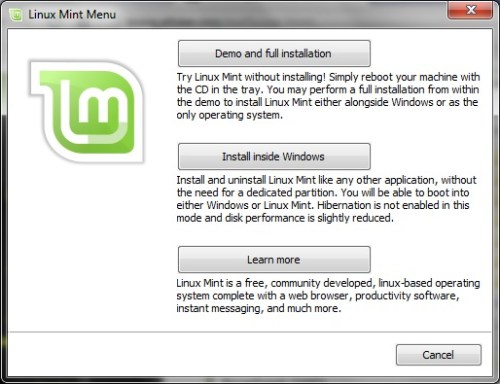
LinuxMint - install1

This installation only took a couple of minutes(*), then a mandatory re-boot, then voila. If I’d just run the installation directly from the ISO image instead of trying to burn a DVD and boot from it, this would have taken 10 minutes rather than 2 hours.
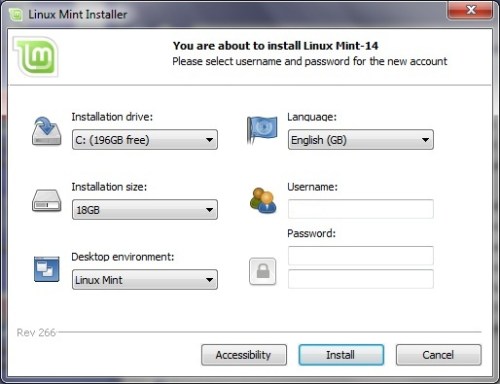
LinuxMint - install2

The Linux Mint desktop started without any manual editing in blacklist files (unlike when I installed Kubuntu last year). I didn’t have any trouble hooking up to Wifi either, just worked out of the box. My laptop is now dual-boot with Linux Mint v Windows 7 – not bad.
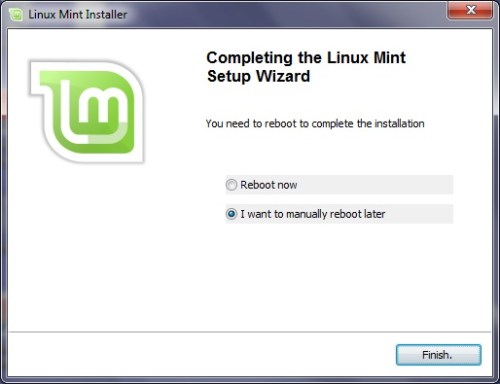
LinuxMint - install3

(*)Except – looks like that was only to run in Live mode (as if from the DVD). The give away was that it forgot my Wifi settings when I next booted into Linux. To actually install, I clicked on the “Install Linux Mint” desktop icon. The instructions were well explained in the handy user guide and only took about 15 minutes.

2 Comments

Filed under Programming, Technology

Choosing a new brand of Linux

I started trying to upgrade my Kubuntu installation so that I could use gcc 4.7 and test the portability of some C++11 code I’ve been writing. So far, it’s not good news – despite having upgraded gcc and Eclipse, the standard library hasn’t upgraded (/usr/lib/c++ only contains 4.6) and trying to install libstdc++ results in obscure error messages.

So the time has come to try a new Linux distribution. Going back a year or so, installing Kubuntu was a chore – my Vaio laptop’s graphics driver wasn’t recognised and I recall making some low-level changes to get it working. Therefore, my main priority is to pick a Linux distribution with easy installation and that hints at good hardware support.

This article talks about Fedora, Mint and Bodhi. Funny that this could be a case of ‘better the devil you know’ – I know an Ubuntu derivative was a pain last time, but at least I did find examples of other people having the same issue as me! I’d never heard of Bodhi before, but it sounds ideal – very fast to install and is an Ubuntu derivative so should support my Vaio hardware.

As for an IDE, I was never very impressed with Eclipse, so I’ll try something else. Each of Codeblocks, NetBeans and CodeLite get good comments.

Leave a comment

Filed under Programming, Technology

The optimizer – Google’s Jeff Dean

Really interesting article on the difference a ten-times-better programmer can make, plus some bogus Jeff Dean facts:

  • Compilers don’t warn Jeff Dean. Jeff Dean warns compilers.
  • Jeff Dean writes directly in binary. He then writes the source
    code as documentation for other developers.
  • When Jeff Dean has an ergonomic evaluation, it is for the protection of his keyboard.
  • Jeff Dean was forced to invent asynchronous APIs one day when he optimized a function so that it returned before it was invoked.

Leave a comment

Filed under Programming, Technology