
Book Review: Night School, Lee Child

For me, there’s a lot of suspense before I read a Jack Reacher thriller. A recent tradition is that Lee Child is interviewed by Phil Williamson Radio 5Live, discusses the book that’s just been published, and reveals the first line of the next book. So in September 2015, we knew the title was Night School and the first line would be: “In the morning they gave Reacher a medal, and in the afternoon they sent him back to school”. And in September 2016, he talked more about the plot. Then I received a lovely hardback edition of the book for Christmas and finally picked it up to read a week ago.  A long build-up, plenty of suspense – would the book be up to the usual standard?

Yes, of course it is.  It’s a flashback to the 1990’s, the days that Reacher was still in the army, at the top of his game, sent on a special investigation to find and destroy a terrorist cell in Germany.  The book features the enigmatic Frances Neagley as well, his top sergeant from the 110th Military Police.  It has all the hallmarks of a classic Jack Reacher thriller, even cheekily putting the standard description of him as “six feet five and two hundred fifty pounds”, even though Tom Cruise is probably picturing himself playing the role in the next movie as  I write this.  The book starts with the premise of an overheard conversation: “The American wants 100 million dollars” – Lee Child doesn’t disappoint.

Here’s the first line of the next book, which carries on from Make Me: “Jack Reacher and Michelle Chang spent three days in Milwaukee.  On the fourth morning, she was gone.”

Leave a comment

Filed under Book Review

Book Review: Con Law, Mark Gimenez

I’ve read several books by Mark Gimenez before and really enjoyed them, so I was surprised to look back and see that I hadn’t read one for over 2 years! Gimenez’ best work are the novels featuring A. Scott Fenney, but in this novel he introduces a new character, John Bookman (known as ‘Book’).

By profession, Book is a professor of constitutional law – he is apparently sort after for his views on media shows and has published widely. Yet, as well as being a celebrity by today’s standards, he is also known for pursuing legal cases on a pro-bono basis, often getting himself and his interns into trouble (they get to come along for the ride, literally, on his Harley). And in another quirk of fate, Book can look after himself – he’s highly proficient in Tae Kwon Do.

Although I enjoyed this book, I didn’t buy into the main character as much as other characters imagined by Gimenez. Book has many similarities to Lee Child’s Jack Reacher – including the womanising, the fights, the investigations and the maverick attitude. I’d rather read Jack Reacher any day – and the latest thriller, Night School, is next on my reading list.

Four stars

1 Comment

Filed under Book Review

How to switch watch faces using swipe gestures

A welcome addition to WatchKit 3.0 is the swipe gesture recognizer.  Previously, I used an ordinary button to switch between modes in my Watch Face app, but now I can mimic the behaviour of official watch faces by swiping left or right.

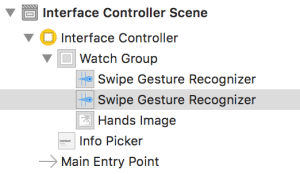
The change is quite simple to make too. First, you just need a Group control that contains an image (into which you’ll draw the watch face). Then, you drag a couple of Swipe Gesture Recognizers into the group, and change the properties so that one is a left swipe and the other is a right swipe.

Having done that, you need to insert an action for each of the gestures – you can do that by control-dragging from the gesture in the storyboard outline into the InterfaceController code. Make sure to add an action (rather than an outlet) – that way, Xcode will create a stub method for you with the correct signature.

The logic for the swipe gesture just switches between watch faces then re-draws the time:

    // Tissot --> Hermes --> Roman
    @IBAction func swipeRight(_ sender: Any) {
        switch (watchFace.id())
        {
        case WatchFaceId.tissot: watchFace = HermesWatchFace()
        case WatchFaceId.hermes: watchFace = RomanWatchFace()
        case WatchFaceId.roman: watchFace = TissotWatchFace()
        }
        
        drawTime() // refresh with updated background & different styles
    }

and the left swipe reverses the transition order.

See also this earlier post that explains how you can draw directly into an image in WatchKit – combined with the swipe gesture recogniser, it provides a neat way to switch between different modes in any app.

Leave a comment

Filed under Swift

C++ London Meetup: Dependency Injection and Clang Tooling

meetup-c-londonPhil Nash organised another C++ London meet-up at SkillsMatter last week. The first talk was by Pete Goldsborough, who gave a rapid overview of the Clang tooling libraries. The second talk was by Kris Jusiak, who talked through the motivation and usage of his Boost::DI dependency injection library. This was more relevant to my work because Kris’s example showed how Boost.DI aims to reduce the overhead in setting up test scenarios for GTest/GMock. I’ve been pretty happy with the way my unit tests look so far, but next time I’ll definitely look at whether his injector object could simplify my code.

Leave a comment

Filed under Meetup

How to prevent F# union case names leaking into parent scope

Suppose you are writing some F# code to model the workings of a coffee shop. You might start by defining a small choice of snacks:

type Cost = int

type Muffin =
| RaspberryAndWhiteChocolate of Cost
| Blueberry of Cost
                          
[<EntryPoint>]
let main argv = 
    // No need for "Muffin." qualifier on Blueberry
    let muffin = Blueberry 250 

    printfn "%A" muffin
    0

This compiles and runs just fine – notice that there’s no requirement to prefix the union case “Blueberry” with the type name “Muffin”. All is well.

However, suppose you then proceed to define some more types for coffee:

              
type Milk =
| Skimmed
| Whole
| SemiSkimmed

type Modifier =
| Milk of Milk
| Cream
| None   // <--- Oops, clashes with FSharpOption.None
             
type Coffee =
| Filter of Modifier
| Cappuccino
| Latte

[<EntryPoint>]
let main argv = 

    let muffin = Blueberry 250

    let coffee = Filter( None )

    printfn "%A %A" muffin coffee
    0

This still compiles and runs – but there’s a lurking problem. As soon as you add the use of optional values, the program fails to compile. For example, you might offer free coffee as a promotion, and model the cost as optional:

    let coffee = Filter( None )
    let cost : int option = None

compileerror
The problem is that None is now used as both a union case in Modifier and a union case in FSharpOption.

Whilst you could choose to workaround this by changing the “None” union case in Modifier to “Nothing”, you may not have that flexibility. Instead, you can use the RequireQualifiedAccess attribute on the Modifier type to stop union case names leaking into the surrounding scope:

[<RequireQualifiedAccess>]
type Modifier =
| Milk of Milk
| Cream
| None 

[<EntryPoint>]
let main argv = 
    let muffin = Blueberry 250 // still no qualifier required
    let coffee = Filter( Modifier.None ) // now requires qualifier
    let cost : double option = None // ok, uses FSharpOption.None

    printfn "%A %A %A" muffin coffee cost
    0

Leave a comment

Filed under F#

Book Review: Ancestral Machines, Michael Cobley

ancestralmachinesThis is the first book that I’ve read from Michael Cobley. I was drawn to it by reviews such as “An absolute cracker of a space opera” and “Here is a space opera which unashamedly honours the roots of the genre”. Also, it’s good to know that there are other related books by the same author in the Humanity’s Fire trilogy.

That said, I found the book overly complex, with a vast array of characters and numerous distinct plot lines that took hundreds of pages to come together. Too often, we were introduced to characters who then seemed to disappear completely. For example, two women in Captain Pyke’s close-knit crew, Dervla and Win, were introduced as integral members of his team. Once captured, the team took on impossible challenges to save them – but unfortunately, we never heard about Win again!

The most memorable character(s) of the book was the drone Rensik Estemil. Hugely intelligent and an effective fighting machine, he somehow got trapped in a mesh box (Faraday cage?!) – but escaped by casting off a mini-Rensik drone which saved the day.
Four stars

Leave a comment

Filed under Book Review

How to extend F# discriminated unions for use from C#

Some time ago, I wrote about calling C# byref methods from F#. This time, I wanted to do things in reverse – the motivation being to provide a neat way of working with F# discriminated unions from C#.

Now, some support comes for free when you define a discriminated union in F#. For example, given this union type:

type Vehicle
| Car of int // number of doors
| Lorry of double // weight in tonnes

then from C#, you could query the union case in turn like this:

if (vehicle.IsCar)
{
    var doors = ((Vehicle.Car)vehicle).Item;
    driveCar( doors );
}
else if (vehicle.IsLorry)
{
    var weight = ((Vehicle.Lorry)vehicle).Item;
    driveLorry( weight );
}

However, although the provided “Is” methods are neat, the cast and the requirement to call “.Item” are rather ugly. What you really want is the ability to get the value of the union case without casting. That’s achievable if you add these methods to the original union definition by hand:

using System.Runtime.InteropServices // for [<Out>]
type Vehicle
| Car of int // number of doors
| Lorry of double // weight in tonnes
with
    member this.TryGetCar( [<Out>] result : int byref ) =
        match this with
        | Car doors ->
            result <- doors
            true
        | _ -> false
    member this.TryGetLorry( [<Out>] result : double byref ) =
        match this with
        | Lorry weight ->
            result <- weight
            true
        | _ -> false

Now the experience is much better from C#:

int doors;
double weight;
if ( vehicle.TryGetCar( out doors ) )
{
    driveCar( doors );
}
else if ( vehicle.TryGetLorry( out weight ) )
{
    driveLorry( weight );
}

and the new methods are usable from F# as well, although you’d probably prefer to use match:

// Use TryGet approach - returns bool, int
let isCar, doors = vehicle.TryGetCar()

// Use match approach - more natural for F#
match vehicle with
| Car doors -> driveCar(doors)
| Lorry weight -> driveLorry(weight)

Leave a comment

Filed under F#, Programming

ACCU Meetup: A Visual Perspective on Machine Learning, Maksim Sipos

meetup-machine-learningMaksim gave a very interesting presentation on Machine Learning, from his perspective as a physicist.

Machine Learning, AI and NLP are some of the most exciting emerging technologies. They are becoming ubiquitous and will profoundly change the way our society functions. In this talk I hope I can provide a unique perspective, as someone who has entered the field coming from a more traditional Physics background.

Physics and Machine Learning have much in common. I will explain how the two fields relate and how a physical point of view can help elucidate many ML concepts. I will show how we can use Python code to generate illustrative visualizations of Machine Learning algorithms. Using these visual tools I will demonstrate SVMs, overfitting, clustering and dimensional reduction. I will explain how intution, common sense and careful statistics matter much when doing Machine Learning, and I’ll describe some tools used in production.

Maksim used Jupyter Notebooks for the demonstration parts of his talk. It’s a great way to show snippets of code as well as plotting charts – I’ve also been using it for a Python library that I’m working on.

The big take-away was that the audience should think of machine learning as very accessible – although there are hard problems left to research, there are a lot of materials available on the internet and much can be understood readily, especially from a visual perspective.

Leave a comment

Filed under Meetup

Tech Book: Algorithms in a Nutshell, Heineman, Pollice & Selkow

algorithmsinanutshellI really enjoyed reading this book, probably the best endorsement I can give for a technical book. The authors introduced the common computer science algorithms that you would expect in a good desktop reference, giving each a block of pseudo code, some analysis of algorithmic complexity and implementation trade-offs, and finally a proper implementation in a standard programming language (usually Java). The later chapters cover slightly more advanced techniques, typically with a practical example. My favourite was their randomised algorithm for estimating a solution to the famous “n-queens” problem (developed by Knuth in 1975).
Five Stars

Leave a comment

Filed under Tech Book

How to use the Digital Crown in a Watch Face App

I’ve written before that, having lived with the Apple Watch for a while, I felt the watch faces lacked variety. So, I wrote a watch face app, which I now use for the majority of the time.

For my next watch face, I thought it would be pretty cool to recreate the look of my beloved Tissot watch. One of its best features is that extra functionality is controlled by twisting/pressing the bezel. It supports date/time/stopwatch/timer – or you can hide the digital display altogether. Although WatchKit doesn’t allow you to capture a button press, you can use the digital crown to scroll between choices – so I thought I’d offer a couple of date formats as well as the option to hide the date altogether. tissot

Add a Picker control onto your storyboard and connect it to a WKInterfacePicker in your InterfaceController. There are a number of styles that you can choose, but for my purposes, I chose the default List style:
screen-shot-2017-01-12-at-19-09-55
Then it’s a matter of populating the picker’s list of items – for example, this code could go in function awake(withContext):

            let blankLine = WKPickerItem()
            blankLine.title = ""
            
            let currentDate = Date()
            let dayDateMonthLine = WKPickerItem()
            dayDateMonthLine.title = "\(currentDate.dayOfWeek()) \(currentDate.dayOfMonth()) \(currentDate.monthAsString())"
            let dateMonthYearLine = WKPickerItem()
            dateMonthYearLine.title = "\(currentDate.dayOfMonth()) \(currentDate.monthAsString()) \(currentDate.year())"
            
            InfoPicker.setHidden( false )
            InfoPicker.setItems( [ blankLine, dayDateMonthLine, dateMonthYearLine, blankLine ] )
            InfoPicker.focus()

I set the focus on the picker so that the digital crown is immediately responsive (otherwise, you’d have to select the picker first on the touch screen). I also put a blank line before and after the date formats, to make the usage more natural. The code above also uses some extension methods on Date.

Tissot style watch face

Seeing how good this looks, I think Apple are missing a trick. All of their analogue Apple Watch faces are round – I hope they ship a couple of rectangular faces in the next Watch OS upgrade.

2 Comments

Filed under Programming, Swift