Keyboard handling in Swift for iOS App

swiftI’ve updated my hobby project to take keyboard input. This ought to be pretty simple, but I came across a few snags that stopped the user experience being as smooth as should be.

Simulator only presents the pop-up keyboard once

This has been bothering me for a while, I resorted to switching to a different simulator profile (e.g. iPhone 4s / iPhone 5). It turns out that, by typing into the laptop keyboard instead of tapping the UI keyboard, the switch to hardware keyboard was semi-permanent. As per this StackOverflow page, you can restore the keyboard by in the Similar by Hardware -> Keyboard -> Toggle Software Keyboard (or ⌘K).

How to change the pop-up keyboard to ‘Done’

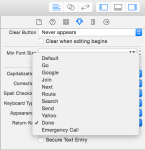
By default, the pop-up keyboard shows the enter/return key as “Return”. For some instances, you want to change that – this is as simple as changing the “Return Key” property on the text field in the story board:
ReturnKeyAppearance

How to dismiss keyboard when user presses return key

By default, the software keyboard does not disappear when you tap return (either on the hardware keyboard or on the software keyboard). There are several steps to achieve this, which are well discussed on StackOverflow. There are a couple of implementations choices for textFieldShouldReturn, this one worked for me:

    // UITextFieldDelegate implementation
    func textFieldShouldReturn(textField: UITextField) -> Bool {
        self.view.endEditing(true)
        return false
    }

coupled with the change below for leaving the text field.

How to dismiss keyboard when user leaves the text field

Another obvious feature I wanted is to dismiss the keyboard if the user taps elsewhere in the App. The key here is to tell the view to recognise a tap (that is, UITapGestureRecognizer). See ‘Close iOS keyboard by touching anywhere’ on StackOverflow discussion.

Leave a comment

Filed under Programming, Swift

Tech Book: Swift for the Really Impatient, Matt Henderson & Dave Wood

SI love the title of this book, the authors kept the content as concise as possible and showed that it really is possible to give a decent introduction to a programming language in just 156 pages (and less than 1cm). The book is quite practical you can read it cover-to-cover to pick up the features of the language, then you can use the handy code snippets as a quick reference guide (and the index is pretty good for this too, not always the case).

I bought a 2015 edition, the only downside being that this seems to be aimed at Xcode 6 and is now slightly out of date. With Swift being an evolving language, that’s to be expected – some readers might prefer to work with the electronic copy and remain up to date.

It’s also worth mentioning that, if your aim is to write a simple iOS app in Swift, you might be better off working through a tutorial and learning Swift that way, along with picking up tips and tricks for working with Xcode. See FoodTracker and To Do.
Five Stars

Leave a comment

Filed under Programming, Swift, Tech Book

Scott Meyers – Good to go

I just read that Scott Meyers has announced he is stepping back from active involvement with C++.   I’ve been a big fan of Scott’s work, I attended his C++ training sessions at DevWeek, London in the late 90’s, and I’ve read his Effective C++|More C++|STL books – except for the most recent one, his take on Effective Modern C++. My copy is now on order. 

Leave a comment

Filed under C++, Programming

Book Review: Make Me, Lee Child

Make Me, Lee ChildThis is the 2015 Jack Reacher thriller which I received in a lovely hard back edition for Christmas. I was lucky to hear an interview with author Lee Child on radio 5Live last year, which ended with a reading from this book. It also revealed some interesting facts about the author:

  • He starts work on a new book on September 1st every year, a superstition based on the success of his first book “Killing Floor”
  • He was born in England (and went to the same school as one of my colleagues) but lives in America and writes in American English
  • His books often switch between narration in the first and third person, the former allowing Jack Reacher to speak for himself, the latter to allow scenes where Reacher is not present
  • He hints that he may end the series of Reacher novels after 21 books, based on some series he read as a young man that seemed about the right length
  • He doesn’t plan the whole book before writing it – this way, he doesn’t know what’s about to happen either and it’s more exciting (!)

Reacher has Chang for an accomplice, a beautiful ex-FBI agent, who is searching for her colleague Keever who disappeared – last known location, Mother’s Rest near Oklahoma City. The underlying mystery is one of the deepest in the series – in fact, it’s a long way into the book before we have a clue what is going on in the town of Mother’s Rest, and there’s still time for a plot twist at the end.

Will this be the penultimate book in the series? Jack Reacher shows vulnerability in this one, he’s actually hurt physically and that could carry into the next book. He also grows more attached to Chang than is usual and perhaps she’ll appear in the next book too – maybe he’ll settle down to a more stable investigative partnership (with benefits)? If he’s on schedule, then Lee Child has already started the book and may even know some of the answers.

Four stars

2 Comments

Filed under Book Review

How to upload iOS App onto iPhone

XcodeI’ve been working on a hobby project for a while, learning Swift and gaining some experience of iOS App development. I reached the stage where the app was worth testing on my iPhone, but found that my version of Xcode (an early v7 beta) required an Apple Developer Licence!
Fortunately, it turns out that upgrading to Xcode 7.2 meant that I could upload to my own phone simply by providing my Apple ID. The upgrade was much easier than I had expected, compared to the number of bad reports on the internet. I used the App Store to upgrade, maybe it’s harder if you download and install the application directly.

Next, I had to find out how to install an application on my device from Xcode. First, connect the device to the Macbook and it will appear in the device list in Xcode above the simulated devices (i.e. all the iPhone and iPad models). Selecting the device by name and clicking run kicks off a full install and runs the app on the phone.

The final question was how to configure my phone to allow apps written by me to run – this was answered on the Apple Developer Forum, and is simply a matter of becoming familiar with Settings -> General -> Profile / Developer App.

I’m impressed by how well Xcode has automated this process, I’m sure a lot of work has gone into making installation onto a device a positive developer experience.

Leave a comment

Filed under Programming, Swift

How to write generic, duck-typing code in F#

When writing generic code in C++, it’s easy to imply constraints in the generic type when developing a template. For example:

template<class T> 
class Announcer{
public:
	static void announce( const T& t )
	{
		std::cout << "And now from " <<  t.country << ", we have: ";
		bool first = true;
		for ( auto person : t.people )
		{
			std::cout << person;
			if (!first) std::cout << "\n";
			first = false;
		}
	}
};

Here, we’re assuming that T has two properties, ‘country’ and ‘people’, with the latter being enumerable (i.e. supports begin/end methods and iterators). This is one of the attractions of C++ for generic code – although, in the future, concepts will enable you to document the constraints in order to make it easier for developers to use your library, and for the compiler to give clearer errors.

What about something similar in F#? I found Tomas Petricek’s post from StackOverflow very useful.

type IHasCountryProperty =
    abstract Country : string

type Announcer<'T when 'T :> IHasCountryProperty>( item : 'T) =
    member this.Announce() =
        printfn "And now the party from %s" item.Country

let inline countrifiedItem<'T when 'T : (member Country : string)> (item : 'T) =
    {
        new IHasCountryProperty with
            member this.Country = (^T : (member Country : string) item)
    }

type London() =
    member this.Country = "England"

// Use it
let city = London()
Announcer( countrifiedItem city ).Announce()

The Announcer class uses a member constraint with statically resolved type parameters which bind to the Country property. Then, the inline static function ‘countrifiedItem’ uses static member constraints to capture the existing Country property on any other type, even if like ‘London’ it doesn’t support the IHasCountryProperty. The consensus seems to be that this approach is encouraged because it documents the requirements on ‘T in an interface.

Leave a comment

Filed under C++, C++ Code, F#, Programming

Regex – concrete use cases

This post by Eric Miller gives 5 use cases for regex.  As per his introduction, I’m only an occasional user of regex, but it’s one of those skills worth learning.

I’ve found knowing some basic regex to be extremely useful in my day-to-day work. So few things pay off such good returns for so little time invested, and I wish I’d learned it years ago

Leave a comment

Filed under Programming

ACCU Meetup: Quicker Sorting, Dietmar Kühl

Meetup - Quicker SortingI was lucky to get an invite to this month’s ACCU London meet-up on the topic of sorting. Dietmar Kuhl hosted the presentation at the plush Bloomberg offices on Finsbury Circus. The talk brought together a sample of approaches to speeding up QuickSort:

  • insertion sort
  • sentinel partitioning
  • hand-rolled sorting for small collections

Overall, these changes (and others) made an impressive improvements, such that the combined algorithm rivalled std::sort for sorting std::vectors of integer. However, the algorithm wasn’t as competitive for other important element types such as std::string.

Dietmar intended the talk to be accessible to all, rather than an in-depth presentation using advanced C++ techniques. I think it was a good example of how you can iterate and bring in multiple techniques to optimise an algorithm for a specific use case.

Leave a comment

Filed under C++, Meetup, Programming

How to define an interface with overloaded methods in F#

In F#, it’s possible to write both object-oriented and/or functional programs.  This means that a task that would be straight-forward in C++, defining an abstract interface containing overloaded methods, is also possible in F#.  However, you have to get the syntax exactly right, otherwise you get obscure compiler errors which could mis-lead you into thinking it isn’t possible after all.  For example, to use overloads, you must define multi-parameter methods using tuples.

type IBlog =
  abstract Write : DateTime * string * string -> IBlog
  abstract Write : string -> IBlog

type MusingStudio =
  interface IBlog with
    member this.Write (entryDate : DateTime, subject : string, body : string) =
      // publish blog entry
      (this :> IBlog)

    member this.Write (subject : string) =
      // automatically generate body and publish (!)
      (this :> IBlog)

Note the syntax of the abstract method declarations carefully.  As per this helpful post on StackOverflow, putting brackets around the tuple changes the signature and leads to confusing compiler errors:

type IBlog =
  abstract Write : (DateTime * string * string) -> IBlog // don't do this!
  abstract Write : string -> IBlog

Whilst it’s possible to implement the interface above and call into it, the syntax to do so involves additional brackets and is unnecessarily clunky.  The syntax at the top of this article is preferable:

let blog = WordPress( "MusingStudio") :> IBlog// create blog
blog
.Write( "How to overload in F#" )
.Write( DateTime.Now, "Book Review: Make Me, Lee Child", "Is this the best Jack Reacher so far?")

Leave a comment

Filed under F#, Programming

Book Review: Thing Explainer, Randall Munroe

IMG_4595Randall Munroe’s  excellent Thing Explainer is on the shelves at Foyles.   I bought this for some fun holiday reading and it’s very good value (£5 in the UK for the hardback edition).

ThingExplainerThe author is probably more widely read as the illustrator of xkcd.

Leave a comment

Filed under Book Review